USER MANUAL
– RAVAS-3200
36
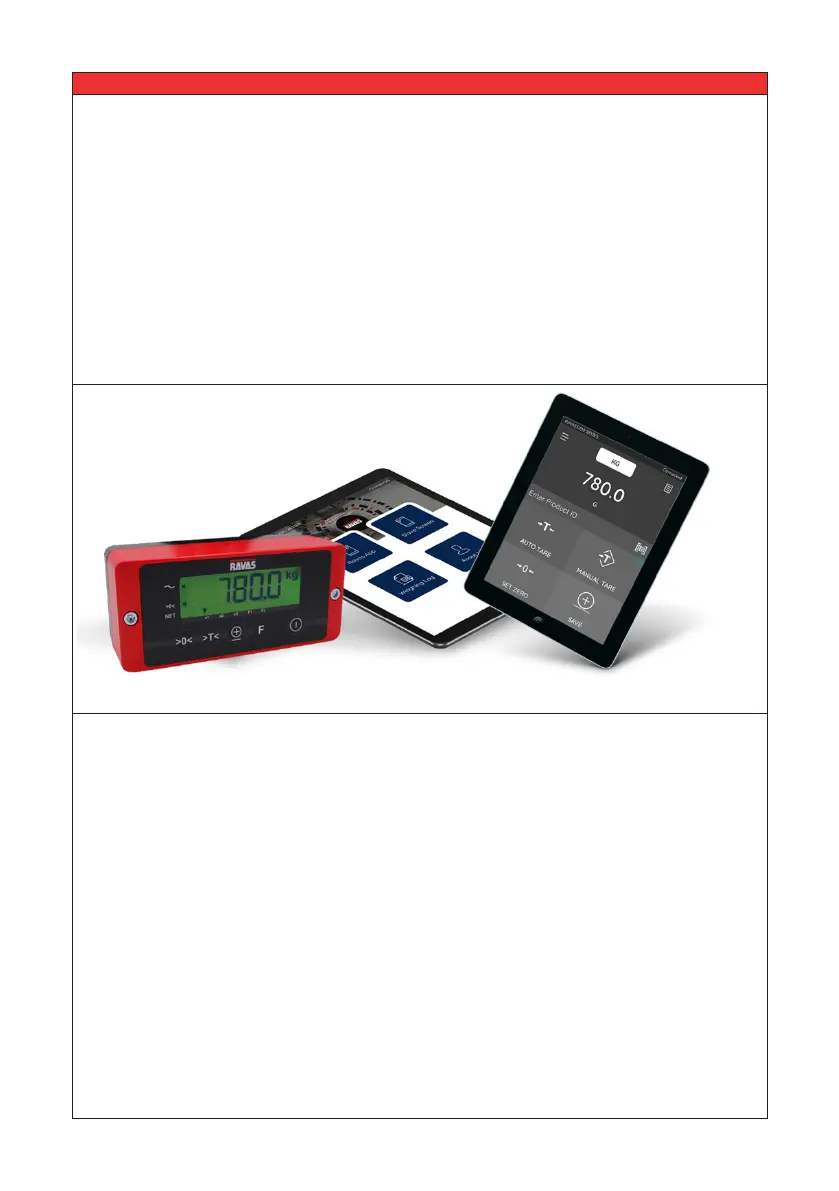
With the RAVAS WeightsApp you can read the data from your mobile weighing
system directly from your smartphone or tablet.
The app not only displays the weight in large digits on a smartphone or tablet, it also
stores the weighed gross weights, tare weight, product code, date & time and the ID
of the device or operator. The data can be sent to any email address as a CSV le,
after which it can be imported in a spreadsheet program on a PC.
From the app you can:
• enter the ID of an operator or device
• enter tares (automatically or manually)
• zero the weighing system
Date and time are automatically generated. If your Android device has an integrated
barcode scanner, you can use it to enter product IDs.
In addition the app makes it possible to download a log le from the RAVAS indicator
and send it for technical analysis as a CSV le in the event of malfunctioning.
The RAVAS WeightsApp can be downloaded for free from Google Play and the Apple
Store.
For instructions for the use of the RAVAS WeightsApp see www.ravas.com.
6 RAVAS WeightsApp - applicable for the RAVAS-3200


 To Previous Page