EasyManua.ls Logo

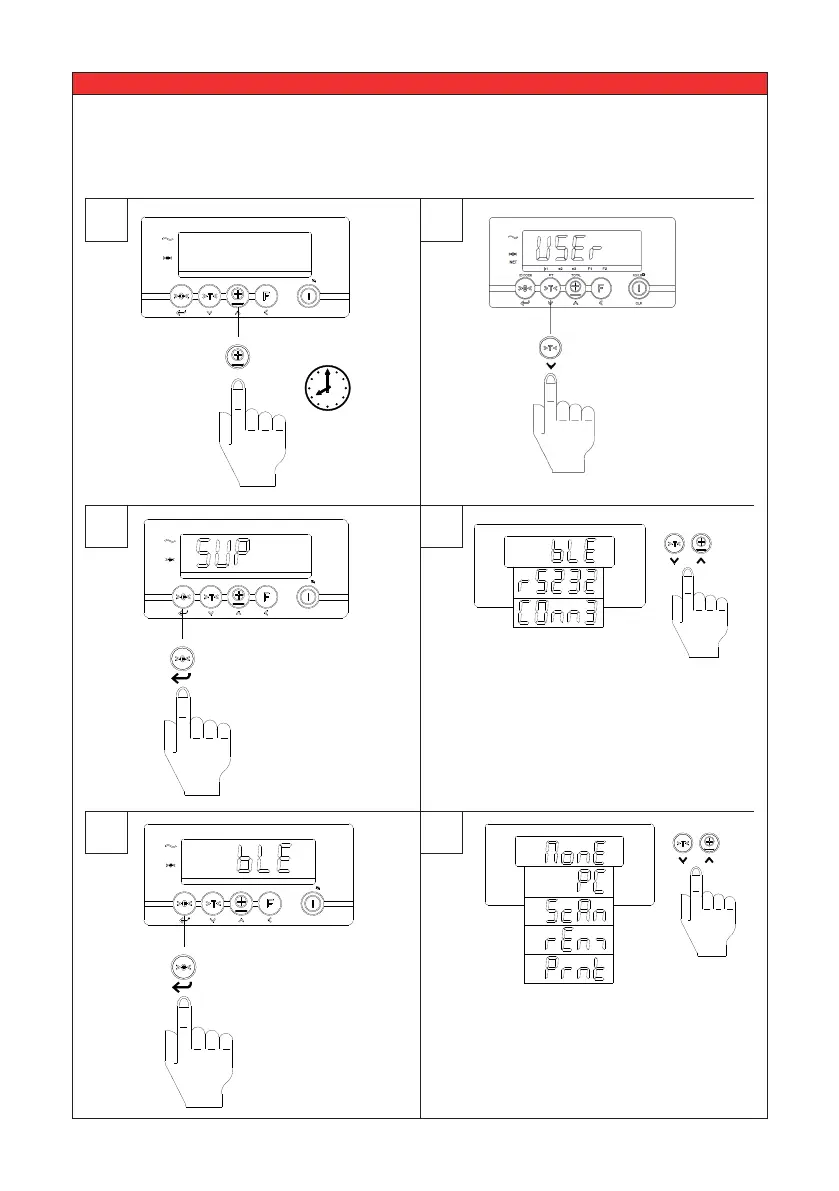
Ravas 3200 - 5.12 Supervisor menu (password protected *1)

Ravas 3200
36 pages
Print Icon
To Next Page IconTo Next Page
To Previous Page IconTo Previous Page
Loading...
USER MANUAL
– RAVAS-3200
28
5.12 Supervisor menu (password protected
*1
)
1
3
4
5
6
2
e1 e2 e3 F1 F2
NET
ID CODE PT TOTAL KG/LB
CLR
e1 e2 e3 F1 F2
NET
ID CODE PT TOTAL KG/LB
CLR
10 sec.
??
The user menu
can be entered
by pressing the
TOTAL key for 10
sec.
e1 e2 e3 F1 F2
NET
ID CODE PT TOTAL KG/LB
CLR
Select to change
the setting.
Press enter to
Select.
Press enter to
Select.
Select to change
the setting.
Press to change to
Supervisor menu.
1 The Supervisor menu is password protected since version 1.01. Earlier versions of the software are not
password protected. For the password please contact RAVAS Service department.

Related product manuals