56
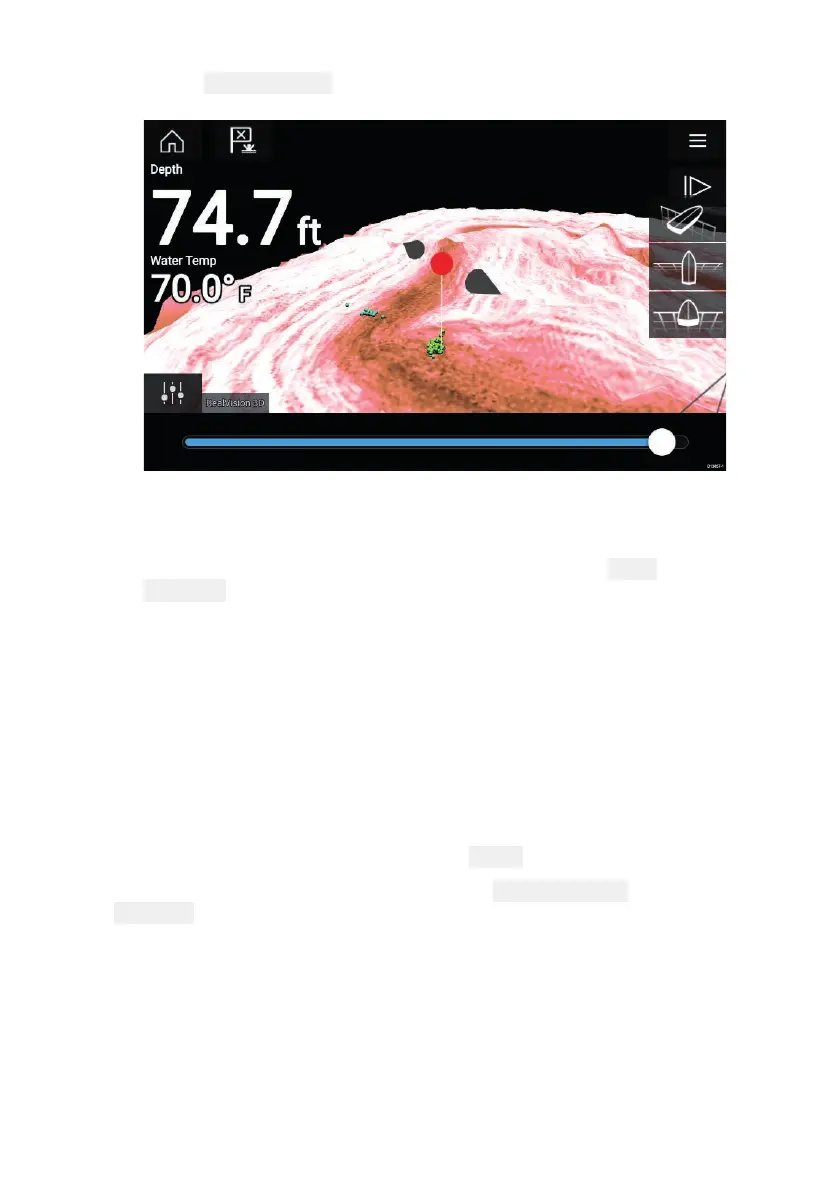
3.Select Movepositiontoadjustthemark
er’spositionbefore
creatingthewaypoint.
Y oucanmovethewaypointalongitscurrentaxisbysliding1finger
acrossthescreen.Y oucanalsoadjusttheviewonscreenusing
theusual2fingertouchgestures.
4.Whenthemarkerisoverthedesiredlocationselect Place
waypointtosaveawaypointatthemarker’slocation.
Sonarscrollback
Y oucan“scrollback”intheSonarapptoviewsonarhistory.
Toactivatesonar“scrollback”,performthefollowing:
•SonarandDownVision—Swipeyourfingerlefttorightacrossthe
sonarscreen.
•SideVision—Swipeyourfingerfromthebottomtothetopofthe
sonarscreen.
•RealVision3D—Selecttheonscreen
Pauseicon.
Whensonarscrollbackisactivethesonar
Scrollbackbarand
Unpauseiconsaredisplayed.



 To Next Page