EasyManua.ls Logo

Raymarine E70498 - User Manual

Raymarine E70498
100 pages
Print Icon
To Next Page IconTo Next Page
Loading...
© 2017 Raymarine UK Limited
87342-1Document number:
12-2017Date:
English (en-US)
Installation instructions

Table of Contents

Questions and Answers

  • V
    Veronica WangNov 2, 2025
    How to troubleshoot Raymarine Radar when no connection can be made to the scanner?
    • J
      Jennifer ThompsonNov 2, 2025
      If you can't establish a connection to the Raymarine Radar scanner, there might be several reasons. First, if you're using a data cable, ensure it's properly connected at both ends and in good condition. If you're using a Wi-Fi connection, double-check that you've entered the correct Wi-Fi passcode for the SSID that matches your scanner. Both the SSID and Wi-Fi passcode can be found on the scanner packaging and on the serial number label on the underside of the unit. Also, the scanner unit may have shut down. You can awaken it by using the Power Up Radar option in the Shortcut screen, accessible on your MFD by momentarily pressing the MFD’s power key. If the Radar unit will shut down within 30 minutes if a wireless (Wi-Fi) connection can’t be made to a multifunction display unit (MFD), ens...

Summary

Chapter 1 Important information

Operation instructions

Reference to display documentation for detailed product operation.

Chapter 2 Document and product information

2.3 Product overview

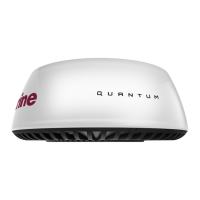
Details on the Quantum 2 Doppler Radome features and technology.

Chapter 3 Planning the installation

3.3 Multifunction display compatibility

List of compatible and incompatible multifunction displays.

3.4 Multifunction display software requirements

Specifies required software version for multifunction displays.

3.8 Location requirements

Guidelines for optimal placement of the radar scanner on the vessel.

Chapter 4 Cables and connections

4.3 Power connection

Detailed instructions for connecting the power supply.

4.4 Network connection

Guidance on connecting the scanner via RayNet or Wi-Fi.

Chapter 5 Mounting

Chapter 6 System checks and troubleshooting

6.2 Troubleshooting

Guidance on identifying and resolving common installation and operation problems.

Chapter 8 Technical support

Chapter 9 Technical specification

Raymarine E70498 Specifications

General IconGeneral
ModelRaymarine E70498
CategoryRadar
Power Output20W
Rotation Speed24 RPM
Range Scales1/16 to 24 nautical miles
Waterproof RatingIPX6
Range24 nautical miles
Display CompatibilityRaymarine Axiom, Axiom Pro, Axiom XL
Weight5.6 kg
Supply Voltage12/24 V DC
TypeQuantum 2 Doppler
Beam Width4.9°

Related product manuals