EasyManua.ls Logo

Raytheon Beech Baron E55 - Page 566

Raytheon Beech Baron E55
903 pages
Print Icon
To Next Page IconTo Next Page
To Previous Page IconTo Previous Page
Loading...
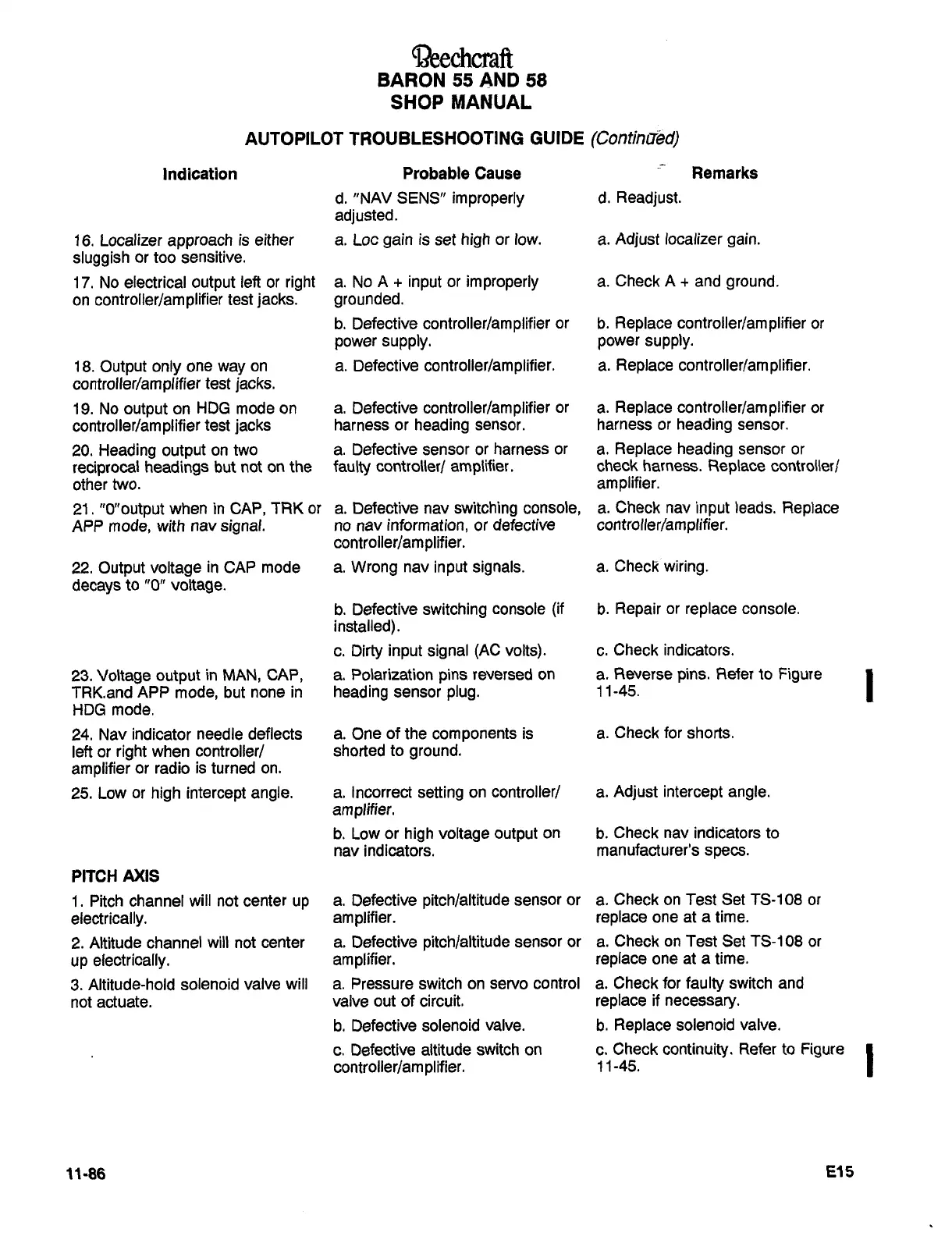
~3eechcraft
BARON
55
AND
58
SHOP
MANUAL
AUTOPILOT
TROUBLESHOOTING
GUIDE
(ContiniT~d)
Indication
Probable
Cause
Remarks
d.
"NAV
SENS"
improperly
d.
Readjust.
adjusted.
16.
Localizer
approach
is
either
a.
Loc
gain
is
set
high
or
row.
a.
Adjust
localizer
gain.
sluggish
or
too
sensitive.
17.
No
electrical
output
left
or
right
a.
No
A
input
or
improperly
a.
Check
A
and
ground.
on
controller/amplifier
test
jacks.
grounded.
b.
Defective
controller/amplifier
or
b.
Replace
controller/amplifier
or
power
supply.
power
supply.
18.
Output
only
one
way
on
a.
Defective
controller/amplifier.
a.
Replace
controllerlamplifier.
controller/amplifier
test
jacks.
19.
No
output
on
HDG
mode
on
a.
Defective
controller/amplifier
or
a.
Replace
controller/amplifier
or
controller/am
plifier
test
jacks
harness
or
heading
sensor.
harness
or
heading
sensor.
20.
Heading
output
on
two
a.
Defective
sensor
or
harness
or
a.
Replace
heading
sensor
or
reciprocal
headings
but
not
on
the
faulty
controler/
amplifier.
check
harness.
Replace
controllerl
other
two.
amplifier.
2l."0"output
when
in
CAP,
TRK
or
a.
Defective
nav
switching
console,
a.
Check
nav
input
leads.
Replace
APP
mode,
with
nav
signal.
no
nav
information,
or
defective
controllerlamplifier.
controller/amplifier.
22.
Output
voltage
in
CAP
mode
a.
Wrong
nav
input
signals.
a.
Check
wiring.
decays
to
"0"
voltage.
b.
Defective
switching
console
(if
b.
Repair
or
replace
console.
installed)
c.
Dirty
input
signal
(AC
volts).
c.
Check
indicators.
23.
Voltage
output
in
MAN,
CAP,
a.
Polarization
pins
reversed
on
a.
Reverse
pins.
Refer
to
Figure
1
TRK.and
APP
mode,
but
none
in
heading
sensor
plug.
11-45.
HDG
mode.
24.
Nav
indicator
needle
deflects
a.
One
of
the
components
is
a.
Check
for
shorts.
left
or
right
when
controller/
shorted
to
ground.
amplifier
or
radio
is
turned
on.
25.
Low
or
high
intercept
angle.
a.
Incorrect
setting
on
controllerl
a.
Adjust
intercept
angle.
amplifier.
b.
Low
or
high
voltage
output
on
b.
Check
nav
indicators
to
nav
indicators.
manufacturer’s
specs.
PITCH
AXIS
1.
Pitch
channel
will
not
center
up
a.
Defective
pitch/altitude
sensor
or
a.
Check
on
Test
Set
TS-108
or
electrically,
amplifier.
replace
one
at
a
time.
2.
Altitude
channel
will
not
center
a.
Defective
pitch/altitude
sensor
or
a.
Check
on
Test
Set
TS-108
or
up
electrically.
amplifier,
replace
one
at
a
time.
3.
Altitude-hold
solenoid
valve
will
a.
Pressure
switch
on
servo
control
a.
Check
for
faulty
switch
and
not
actuate.
valve
out
of
circuit,
replace
if
necessary.
b.
Defective
solenoid
valve,
b.
Replace
solenoid
valve.
c.
Defective
altitude
switch
on
c.
Check
continuity.
Refer
to
Figure
controller/am
pi
ifier.
1
1
-45.
11-86
515

Table of Contents

Related product manuals