14
TROUBLESHOOTING
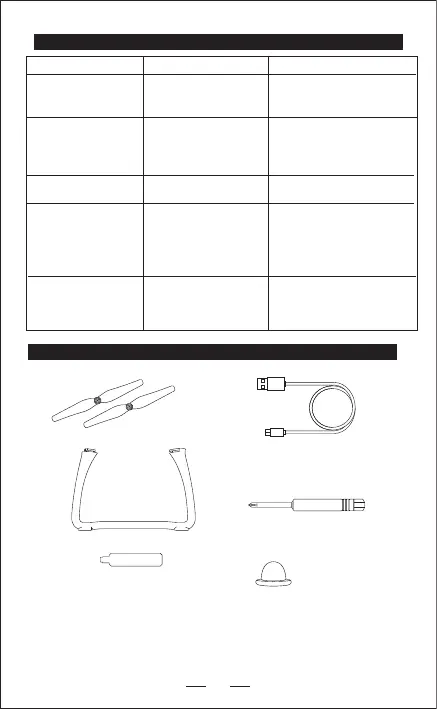
PARTS LIST (Included)
Drone’s lights are ashing
and no response from the
drone.
The blades spin but the
drone does not take o.
1. The blades are not
placed properly.
2. The blades are damaged.
1. Transmitter is not paired
to the drone.
2. No battery power.
1. Follow the pairing process.
2. Charge the battery.
1. Make sure your blades are
placed properly according
to page 4.
2. Replace the blades
Blade A/B X2
Screwdriver X1
Blade Cap X2
USB Cable X1
Only for charging
Landing Gear
X2
PROBLEM
REASON SOLUTIONS
Tripod Wrench X1
The drone shakes
uncontrollably.
Drone does not hover
accurately.
Drone does not achieve
“Ready to y”.
No/Weak GPS reception.
1. Wait a few minutes for
GPS reception.
2. Stay away from reception
blocking structures.
1. The blades are damaged.
2. One of the motors is not
spinning in accurate speed.
3. The gyroscope is out of
balance.
4. The drone needs trimming.
1. Replace the blades
2. Replace the motor.
3. Calibrate the gyroscope
(Page 7 step 3).
4. Follow trimming instructions.
The blades are damaged.
Replace the blades
A
B
We believe that you should make the most out of your drone.
If you are ever in need of advice, service or parts please visit our website
for a list of our retailers.
WWW.RCPRO.CA


 To Previous Page