Low Electricity High
4
1
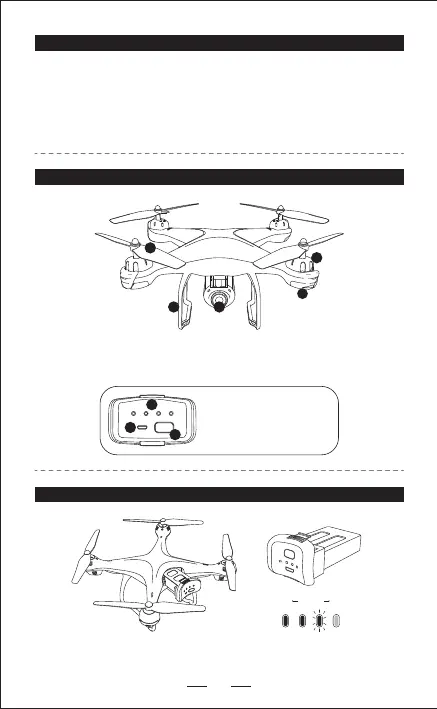
1. HD Camera 2. Landing Gear
3. Blade 4. Motor 5. LED indicator
2
3
1. Battery power indicator
2. USB charging port
3. Battery switch
MAINTENANCE
1. Use a clean soft cloth to clean this product frequently.
2. Avoid heating or prolonged exposure to the sun.
3. Don’t put the product in water. It will damage electronic parts.
4. Please check the plug and other accessories at regular intervals. If there is
any damage, please stop using it immediately until it is repaired completely.
BATTERY OPERATION
Press the battery shortly to switch on, hold for 2 seconds to switch it o.
12
3
4
DRONE PARTS
Blade A
Blade A Blade B
Blade B
5


 To Next Page