10
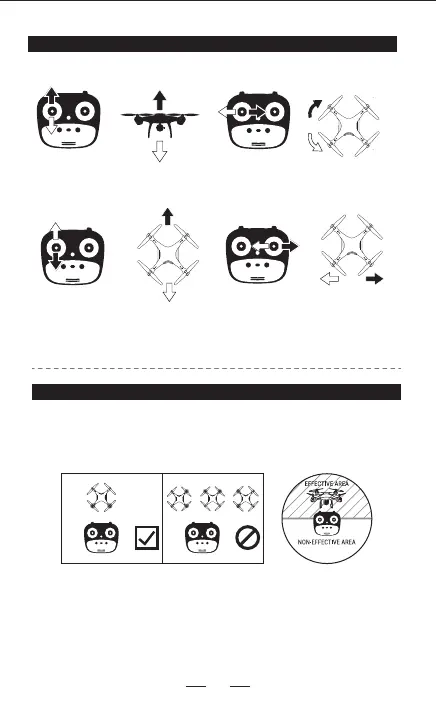
Please put the drone in a forward-facing position. After syncing, but
before take-o, press the Headless Mode button on the remote control
and to enter Head-less Mode. Press it once again to exit Headless Mode.
HEADLESS MODE
OPERATING INSTRUCTIONS
Push the left lever (accelerator) up and
down, The drone will ascends and
descends accordingly.
Ascend
Descend
Push the left lever (accelerator) leftward
and rightward,the drone will turn left
and turn right accordingly.
Left turn
Right turn
Push the right lever (swerving rudder),
the drone will go forward and
backward accordingly.
Fowards
Backwards
Push the right lever (swerving rudder)
leftward and rightward, the drone
will go leftward and rightward accordingly.
Left
sideward fly
Right
sideward fly


 To Next Page