5
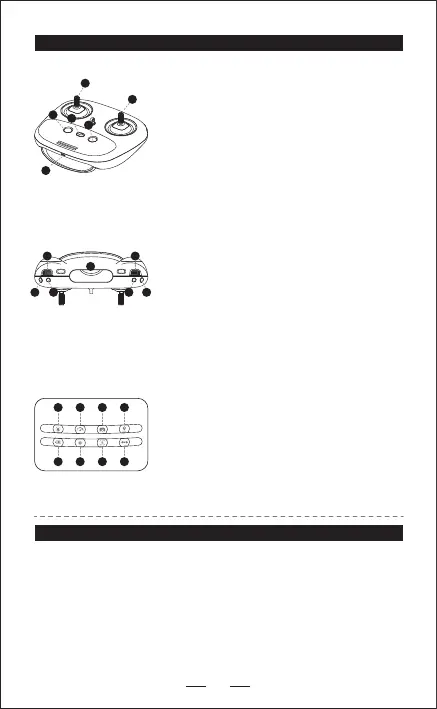
REMOTE CONTROL
BATTERY CHARGING INSTRUCTIONS
1. The included rechargeable battery can be charged while being
connected or disconnected for the drone. Plug the USB cable to the
battery and plug the other side to a power source and the battery will
recharge.
2. You can use car USB port or power banks to charge this battery.
3. Full charging time takes about 60 minutes, Flight time about 8 minutes.
4. The transmitter is equipped with a rechargeable lithium battery.
Charging time: Approx. 50 minutes Run time: Aprox. 3 hours
1
2
3
4
5
6
13
98
7
10
12
11
1. Throttle joystick.
2. Direction joystick.
3. Press for one button RETURN HOME;
press again to cancel Return Home.
4. ON / OFF.
5. One button take o with auto hover, one button
landing Hold 3 secs for Emergency stop.
6. USB charging port.
7. Speed+/Speed-.
8. Hold the button for 3 seconds, enter Trim mode.
Click the button, cancel Trim mode.
Note: No need to trim under the GPS mode.
9. Click once to toggle headless/normal mode.
Hold the button for 3 seconds to turn o GPS
mode.
10. Adjust the angle of camera: Spin button down:
camera down. Spin button up: camera up.
11. Click the button to take photo.
12. Click the button to take video; Click the button
again to cancel video mode.
13. Phone Holder.
14. Power.
15. Speed.
16. Video.
17. Return Home.
18. Charging.
19. Headless Mode.
21. Trim-See #8 above for access to trim mode.
14 15 16 17
18 19 20 21


 To Next Page