24
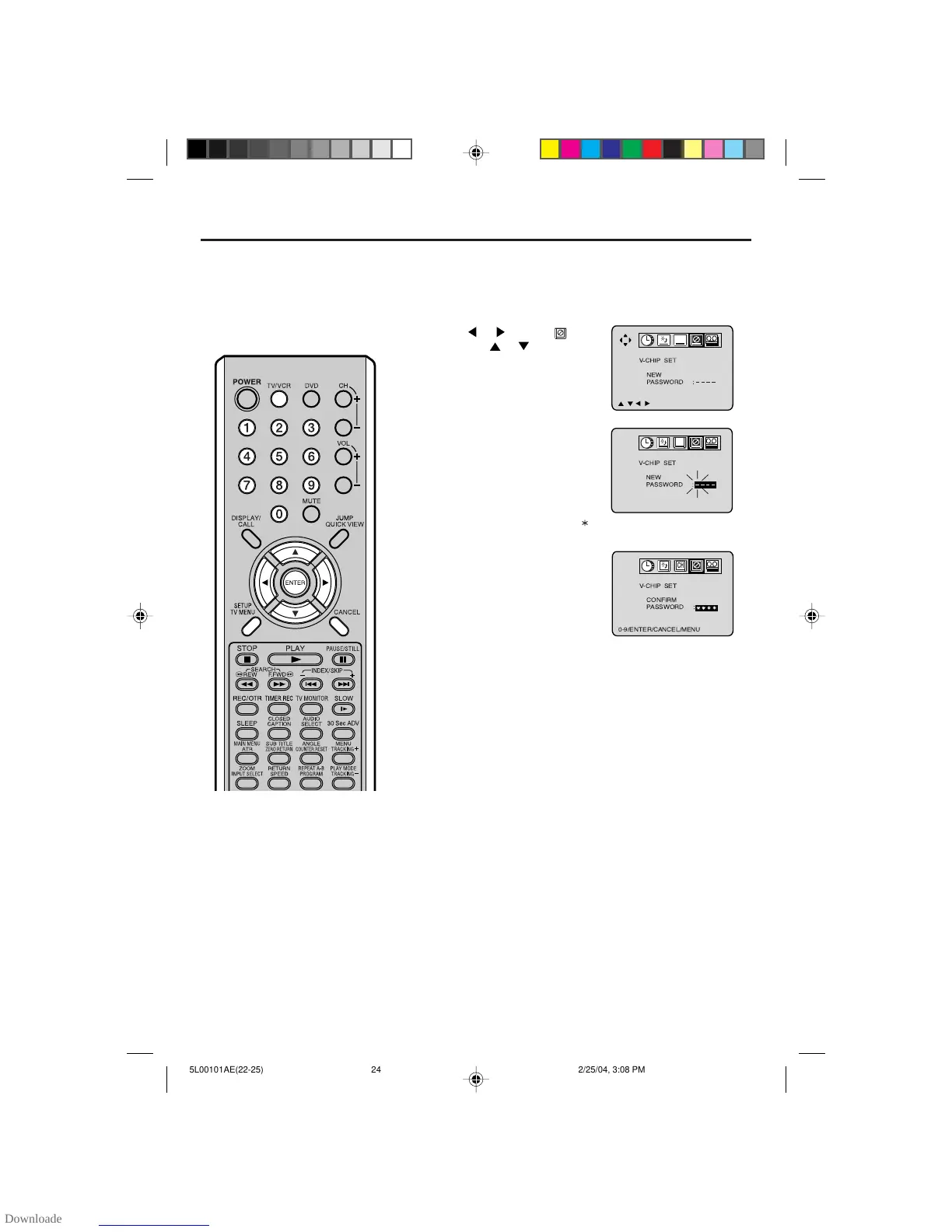
Press or to select option,
then press
or to select
“PASSWORD”.
Setting the V-Chip
Press TV/VCR. Press TV MENU, the TV/VCR menu
screen will appear.
Enter the password (4 digits)
using the number buttons (0-9),
then press ENTER.
If you put in a wrong number,
press CANCEL.
Enter the same password again,
then press ENTER.
The password is now registered
and the V-Chip Set menu ap-
pears.
TO REGISTER PASSWORD
An age limitation can be set to
forbid children to see and hear
violent scenes or pictures for
adults, etc. The TV/VCR/DVD
corresponds to "TV RATING" and
"MOVIE RATING". To use the
V-Chip function, you must register
a password.
NOTES:
• To avoid forgetting the password,
write it down and keep it in a safe
place.
• If you forget the password...
1. Disconnect the AC cord plug from
the AC outlet and leave the TV/
VCR/DVD unplugged for more than
two minutes.
2. Insert the AC cord plug again, and
turn the volume level to a
minumum.
3. Press the VOL- button on the TV/
VCR/DVD and the 0 button on the
remote control for more than 2
seconds simultaneously.
1
2
3
4
" " appears instead of the number.



 To Next Page