AUDI(
Button
- TREBLE +
BASS
BALANCE
AUDIO: STEREO
SAP: OFF
SPEAKERS: ON
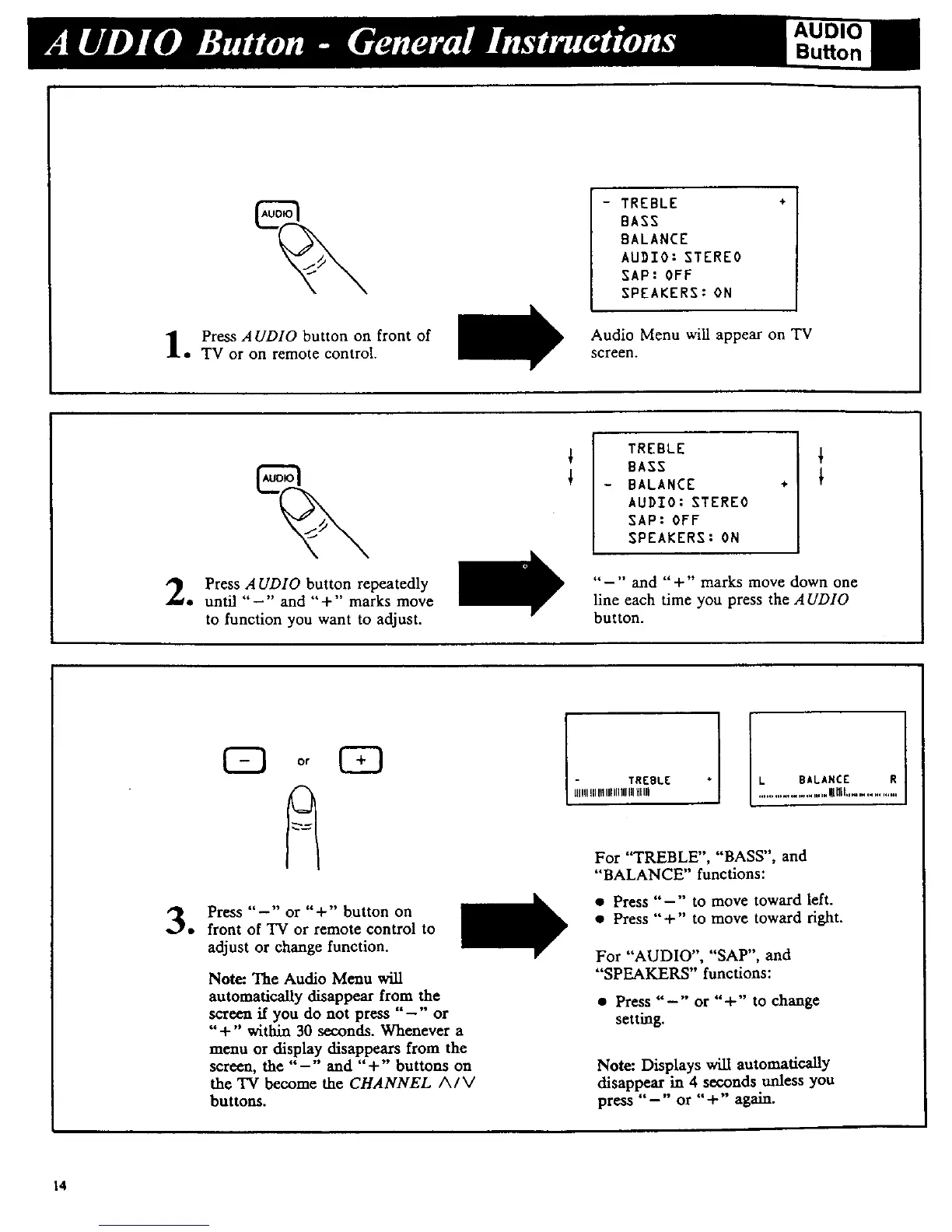
Press AUDIO button on front of
• TV or on remote control.
Audio Menu wiU appear on TV
screen.
TREBLE
BASS
BALANCE
AUDIO: STEREO
SAP: OFF
SPEAKERS: ON
÷
Press AUDIO button repeatedly
• until "-" and "+" marks move
to function you want to adjust.
"-" and "+" marks move down one
line each time you press the AUDIO
button.
Press "-" or "+" button on
• front of TV or remote control to
adjust or change function.
Note: The Audio Menu will
automatically disappear from the
screen if you do not press "-" or
"+" within 30 seconds. Whenever a
menu or display disappears from the
screen, the "-" and "+" buttons on
the 'IV become the CHANNEL A/V
buttons.
TREBLE
UlIIIIII111111111111111HIUl
BALANCE R
.....................Wnll...............
For "TREBLE", "BASS", and
"BALANCE" functions:
• Press "-" to move toward left.
• Press "+" to move toward fight.
For "AUDIO", "SAP", and
"SPEAKERS" functions:
• Press "-" or "+" to change
setting.
Note: Displays will automatically
disappear in 4 seconds unless you
press "-" or "+" again.
14



 To Next Page