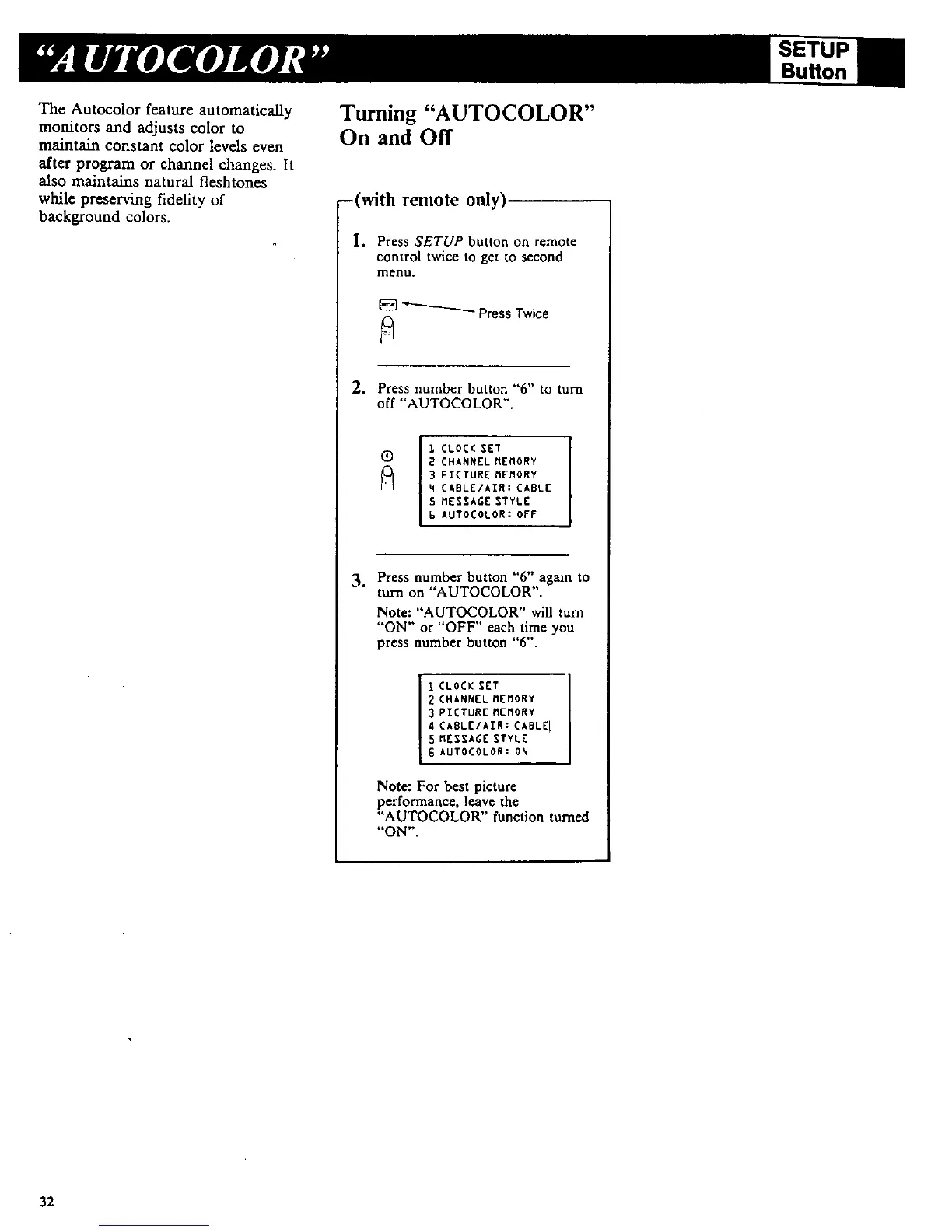
The Autocolor feature automatically
monitors and adjusts color to
maintain constant color levels even
after program or channel changes. It
also maintains natural fleshtones
while preserving fideUty of
background colors.
Turning "AUTOCOLOR"
On and Off
-(with remote only)
I.
Press SETUP button on remote
control twice to get to second
menu.
_ PressTwice
2. Press number button "6" to turn
off "'AUTOCOLOR".
!
1 CLOCK SET I
(_ 2 CHANNEL MEMORY
I
3 PIETURE MEMORY
4 CABLE/AIR: CABLE
5 MESSAGE STYLE
6 AUTOCOLOR: OFF
3. Pressnumberbutton"6"ag_nto
rum on"AUTOCOLOR".
Note: "AUTOCOLOR" will rum
"ON" or "OFF" each time you
press number button "6".
I CLOCK SET
2 CHANNEL MEMORY
3 PICTURE MEMORY
4 CABLE/AIR: CABLE I
5 MESSAGE STYLE
6 AUTOCOLOR: ON
Note: For best picture
performance, leave the
"AUTOCOLOR" function turned
"'ON".
SETUP
Buffon
32



 To Next Page