EN - 16
Customizing the DVD Function Settings
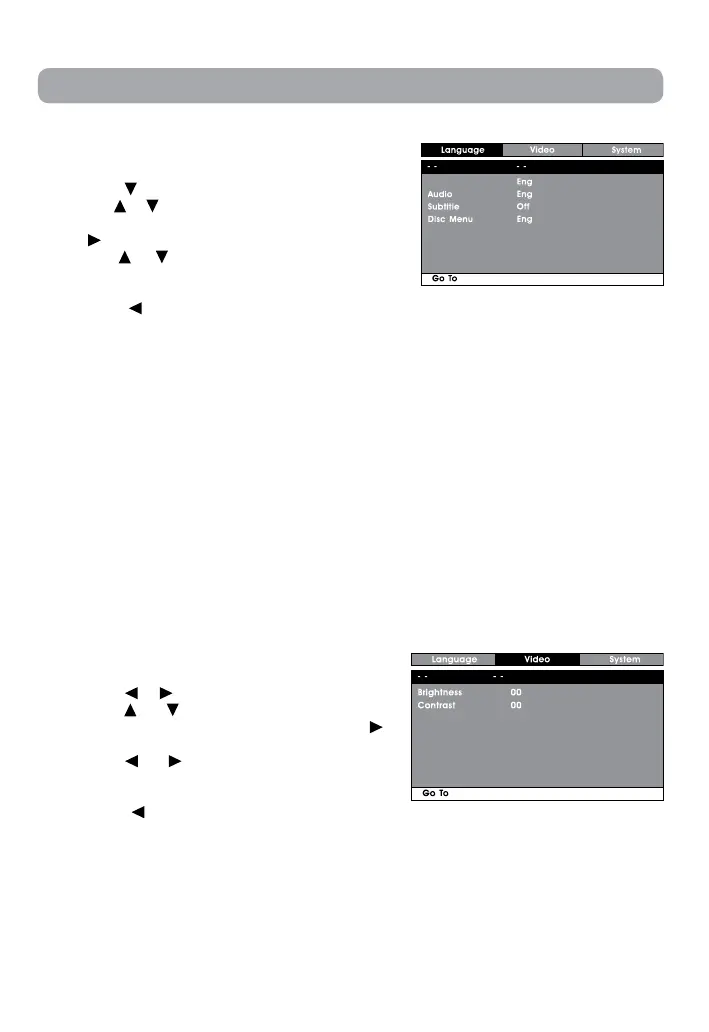
Language Setup
1. Press the SETUP button on the remote control in
stop mode (when disc is not playing).
2. Press the
button to select Language Menu.
3. Use the
or button to select the option (Player
Menu, Audio, Subtitle or Disc Menu), then press
the
button.
4. Use the
or button to select your preferred
language, then press the ENTER button to
conrm.
5. Press the
button to go back to the previous
menu. Repeat steps 3 and 4 to adjust other
options.
6. To exit the SETUP MENU and return to the normal
screen, press the RETURN or SETUP button.
Language Menu
Player Menu
Language Menu
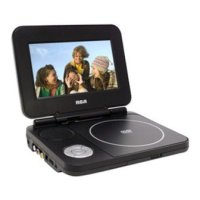
Video Setup
1. Press the SETUP button on the remote control in
stop mode (when disc is not playing).
2. Press the
or button to select Video Menu.
3. Use the
or button to select the option
(Brightness or Contrast), then press the
button.
4. Use the
or button to make adjust the
setting,thenpressENTERbuttontoconrm.
5. Repeat steps 3 and 4 to adjust other options.
Press the
button to return to the previous
menu.
6. To exit the SETUP MENU and return to the
normal screen, press the RETURN or SETUP
button.
Video Menu
Video Menu
Note:
• Some DVDs may not play in the audio language selected. A prior language may be
programmed on the disc.
• SomeDVDsmaybesettodisplaysubtitlesinalanguageotherthantheoneselected.A
prior subtitle language may be programmed on the disc.
• SomeDVDsallowyoutochangesubtitleselectionsviathediscmenuonly.Ifthisisthecase,
press the MENU button and choose the appropriate subtitle from the selection on the disc
menu.
• Some DVDs may not included your pre-selected language. In this case, the DVD player
automatically displays disc menus consistent with the disc’s initial language setting.


 To Next Page