Connections & Setup
Chapter 1
PR
DVI-HDTV
VID1
VID2
CMP1
COMPOSITE INPUTS
COMPONENT
INPUT
V L R
L R
FIXED AUDIO
AUDIO
SUBWOOFER
AUDIO/VIDEO OUTPUT
S-VIDEO
V
R
R
Y
L
R
L
PB
FOR FACTORY
USE ONLY
VARIABLE
V
R
HDTV
ANTENNA/
CABLE
ANALOG
INPUT
L
/
MONO
L
/
MONO
ANTENNA
DIGITAL
INPUT
IN
OUT
A/V RECEIVER
VCR
IN
TV
IN
OUT
TAPE
IN
CD
L
R
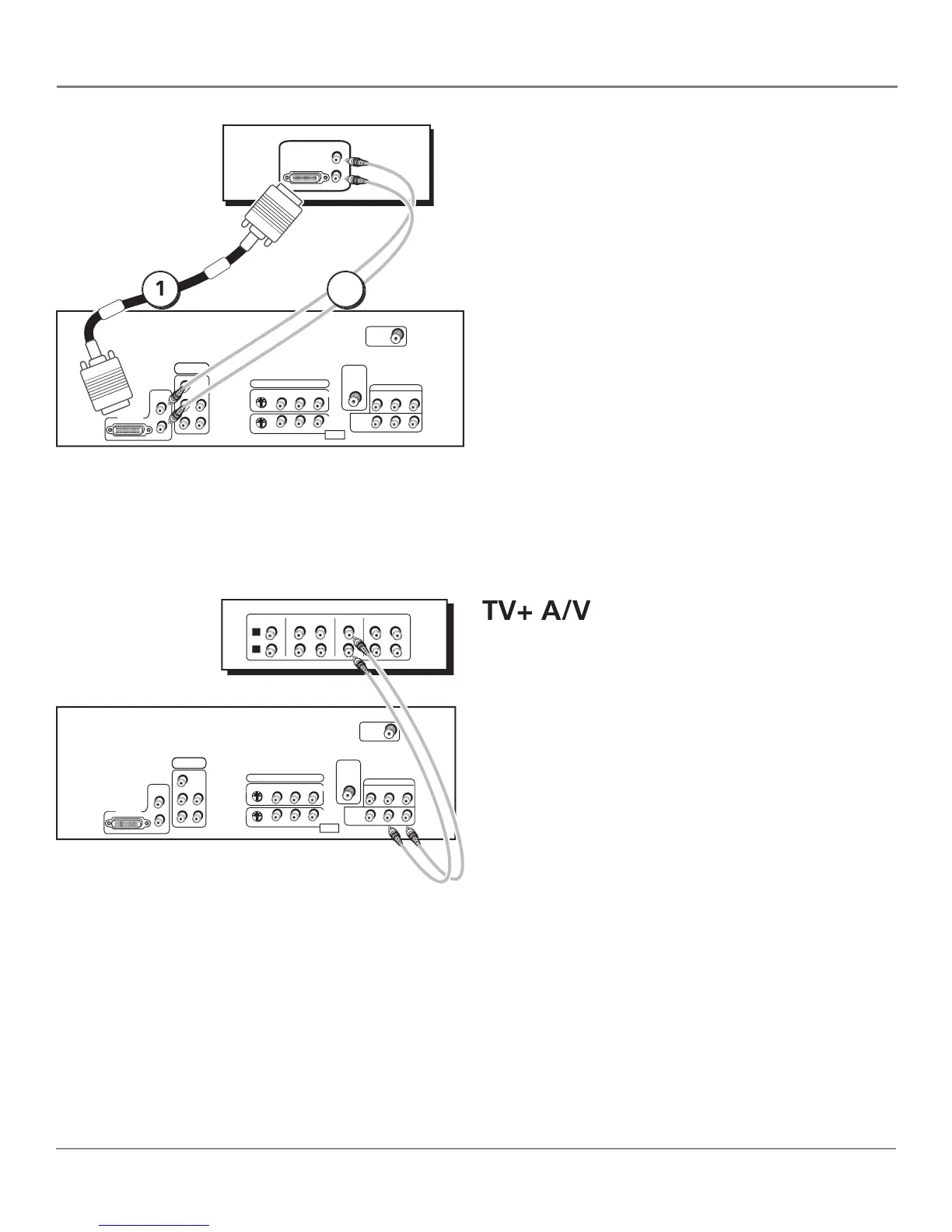
To connect a DVI Component to your TV:
1. Connect the audio (white and red) cables to the DVI-
HDTV L and R audio jacks on the back of the HDTV and
to the audio output jacks on the DVI component.
2. Connect the video cable to the DVI-HDTV jack on
the back of the HDTV and to the DVI jack on the DVI
PR
DVI-HDTV
VID1
VID2
CMP1
COMPOSITE INPUTS
COMPONENT
INPUT
V L R
L R
FIXED AUDIO
AUDIO
SUBWOOFER
AUDIO/VIDEO OUTPUT
S-VIDEO
V
R
R
Y
L
R
L
PB
FOR FACTORY
USE ONLY
VARIABLE
V
R
HDTV
ANTENNA/
CABLE
ANALOG
INPUT
L
/
MONO
L
/
MONO
ANTENNA
DIGITAL
INPUT
DVI-HDTVDVI-HDTV
AUDI
O
LL
R
DVI COMPONENT
These are two different ways your TV uses a component to
Connect audio cables to either the FIXED or
AUDIO L and R OUTPUT jacks and to the audio inputs on
If you've connected your VCR or other
component to the FIXED outputs on the HDTV, use the
VARIABLE inputs for your A/V Receiver.
provides fi xed-level audio output from the TV.
This audio output is ideal for connecting to an A/V
receiver that has its own volume control.
provides variable-level audio output.
Volume levels can be controlled by the volume
controls on the TV and TV remote control.



 To Next Page