,
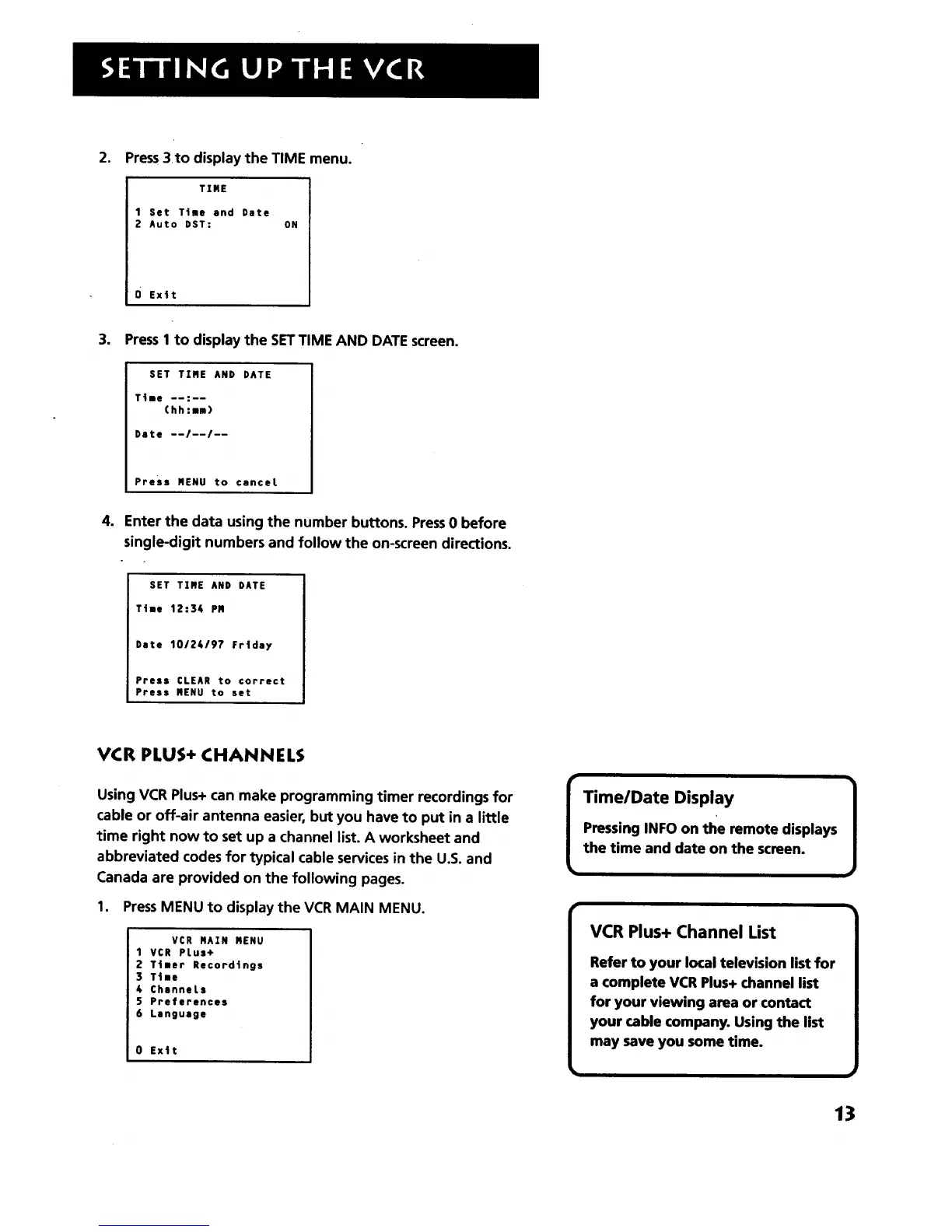
Press3to display the TIME menu.
TIME
1 Set Till and Date
2 Auto DST: ON
0 Ex4t
.
PressI to display the SETTIME AND DATE screen.
SET TIME AND DATE
T41e --:--
(hh:lm)
Date --/--/--
Press MENU to canceL
4. Enter the data using the number buttons. Press0 before
single-digit numbers and follow the on-screen directions.
SET TIME AND DATE
T|I! 12:34 PM
Date 10124197 Frtday
Press CLEAR to correct
Press MENU to set
VCR PLUS+ CHANNELS
Using VCR Plus+ can make programming timer recordings for
cable or off-air antenna easier, but you have to put in a little
time right now to set up a channel list. A worksheet and
abbreviated codes for typical cable services in the U.S. and
Canada are provided on the following pages.
1. Press MENU to display the VCR MAIN MENU.
VCR HAIM MENU
1VCR PLus+
2 T|ner Record|ngs
] Tile
4 ChanneLs
S Preferences
6 Language
0 Exit
Time/Date Display
VCR Plus+ Channel List
Refer to your local television list for
a complete VCR Plus+ channel list
for your viewing area or contact
your cable company. Using the list
may save you some time.
13



 To Next Page