Examples of dip-switch settings:
DIP 1/3 DIP 2/4 MODE USE (EXAMPLES)
OFF – 20 dBu LINE Audio source having a – 20 dBu output
OFF MIC MIC Dynamic microphones
PHANTOM – 20 dBu LINE with PHANTOM BM 3001 paging microphone
PHANTOM MIC MIC with PHANTOM Electret microphones
13
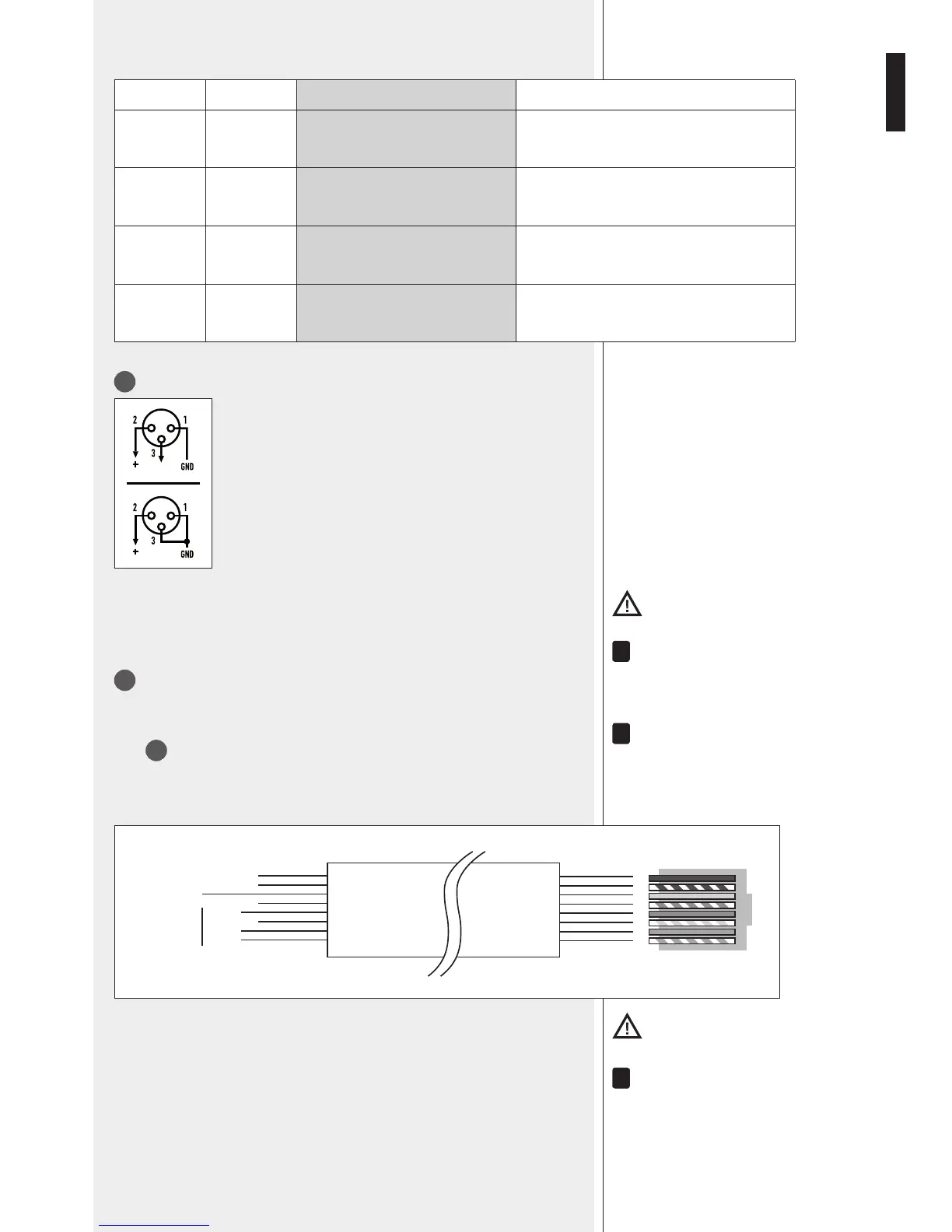
Balanced audio input 1 (XLR socket)
Balanced connection + hot
– cold
GND ground
Unbalanced connection
Important: It Is necessary to eIther lInk the cmD pIn to grounD of the respectIve
removable connector or use the voX functIon to open the auDIo Input 1.
Do noT Use an UnbalanCeD ConneCTion when The ‘PhanToM’ Power sUPPly is swiTCheD on.
14
Balanced audio input 2 (RJ 45 port)
(for a BM 3001 paging microphone).
noTe: when a bM 3001 Paging MiCroPhone is ConneCTeD, iT is neCessary To seT The DiP-swiTChes 1
anD 2
To The ‘line wiTh PhanToM’ MoDe .
The bM 3001 Paging MiCroPhone shall be seT To ‘loCal’.
Cable with RJ 45 plug:
gnd
+
–
Priority
command
(to gnd)
Audio
signal
Green
Blue
Orange
Orange/White
Brown
Brown/White
Green
Blue/White
Blue
Green/White
Orange
Orange/White
12345678
RJ
Important: It Is necessary to use the rJ 45 port prIorIty commanD to open the auDIo Input
2. (for Instance, through the bm 3001 pagIng mIcrophone push-button).
alThoUgh eaCh MiC-line inPUT has 2 DifferenT ConneCTors, These CannoT be UseD To MiX DifferenT
signals; only one aUDio soUrCe Can be ConneCTeD.


 To Next Page