Need help?
Do you have a question about the RD Instruments WorkHorse and is the answer not in the manual?
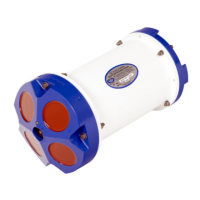
Details the ADCP's components: transducer, connector, housing, sensors, and head.
Explains the Deck Box's interfaces, power switch, status LED, and reset button functions.
Describes the mounting plate's function, material, dimensions, and bolt hole pattern for vessel mounting.
Provides instructions for connecting and disconnecting the I/O cable, warning against improper handling.
Discusses optional PCMCIA memory card slots and their use for data storage and recovery.
Lists the components included in the spare parts kit with their respective part numbers.
Crucial guidelines for protecting the ADCP's components from damage during handling.
Instructions for proper assembly, including O-rings, lubricant, and cable connections.
Advice on compass alignment and avoiding magnetic interference during deployment.
Specifies the standard communication settings (RS-422, baud rate, parity, etc.) for the ADCP.
Troubleshooting steps for when the WorkHorse fails to respond, checking key system components.
Lists the hardware and software prerequisites for installing and running the WorkHorse software.
Step-by-step instructions for installing the WorkHorse software from the provided CD-ROM.
Explains how the deck box scales input voltage and the behavior with multiple power sources.
Details power consumption in different states and battery life estimates for bench-top operations.
Explains the two operating modes: Command Mode and Ping Mode (Deployment Saver).
Instructions on setting up the ADCP and environment for successful compass calibration.
Describes a built-in test to measure and verify the accuracy of the compass calibration.
Details the steps for performing the compass calibration procedure, including rotations and tilt adjustments.
Guidelines for maintaining the optional pressure sensor, focusing on cleaning the port.
A comprehensive list of checks to perform before deploying the ADCP.
Reminders for preparing the ADCP, including testing, desiccant, and compass calibration verification.
Describes the role of RDI software in setting up and collecting data for deployment.
Advice on deployment considerations like tilt angles and anti-fouling paint application.
Instructions on sending deployment commands to the ADCP using specific software.
Explains how to interpret the spatial location of collected data using the velocity display.
Details how the time of data collection is recorded and associated with ensembles.
Discusses the units of velocity data and the impact of salinity on accuracy.
 General
| Category | Acoustic Doppler Current Profiler (ADCP) |
|---|---|
| Manufacturer | RD Instruments |
| Frequency | 300 kHz, 600 kHz, 1200 kHz |
| Velocity Range | ±5 m/s |
| Beam Angle | 20° or 30° (depending on the model) |
| Beam Configuration | 4-beam Janus configuration |
| Operating Temperature | -5°C to 45°C |
| Dimensions | Varies depending on the model |
| Interface | RS-232, RS-422 |
| Communication | Serial |
| Data Output | Binary or ASCII data formats |
| Model | WorkHorse Series (Multiple models exist, e.g., Sentinel, Mariner, Quartermaster, Rio Grande) |

 To Next Page