Need help?
Do you have a question about the RD Instruments WorkHorse Sentinel and is the answer not in the manual?
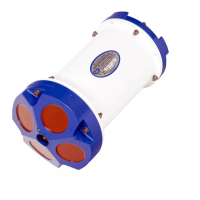
Overview of the Sentinel ADCP, its components like transducer, housing, and sensors.
Details the input/output cable, its connectors, and proper disconnection procedures.
Explains the internal and external battery packs, voltage, and replacement considerations.
Describes flash memory cards, their capacity, and location for data storage.
Lists included spare parts and their part numbers for maintenance.
Provides essential guidelines for handling the WorkHorse safely to prevent damage to components.
Instructions for re-assembling the WorkHorse, focusing on O-ring integrity and hardware tightening.
Guidelines for deployment, including compass alignment and avoiding ferro-magnetic materials.
Details standard and alternative serial communication settings (RS-232, RS-422) for the WorkHorse.
Troubleshooting steps for when the WorkHorse fails to respond to commands or requests.
Specifies the necessary hardware and software requirements for running WorkHorse software.
Step-by-step instructions on how to install the WorkHorse software packages.
Information on provided DOS utility programs that supplement Windows software features.
Outlines the WorkHorse's self-contained data collection process and software workflow.
Explains the standard filename format for raw data and log files produced by WorkHorse software.
Details the AC adapter's power output and its limitations compared to battery power.
Specifies the usable energy capacity of the standard alkaline battery packs.
Describes the external battery pack, its capacity, and placement for compass interference.
Guidance on reusing alkaline battery packs, including voltage checks and capacity considerations.
Information on the power consumption of the WorkHorse during bench-top testing and sleep modes.
Explains the two operational modes: Command Mode and Ping (Deployment Saver) Mode.
Steps to prepare the WorkHorse and environment for accurate compass calibration.
Describes the automated built-in test to verify the accuracy of the compass calibration.
Detailed procedure for performing compass calibration, including rotations and error analysis.
Maintenance guidelines for the optional pressure sensor, including cleaning and potential issues.
A comprehensive checklist to ensure the WorkHorse is ready for a self-contained deployment.
Steps and considerations for preparing the ADCP before initiating a deployment.
Guide on using the WinSC Deployment Wizard for planning, setup, and sending commands.
Details the planning phase of the wizard, setting parameters and creating command files.
Procedure for synchronizing the ADCP's internal clock with the computer's time.
Steps to verify the ADCP's compass calibration as part of the deployment process.
Guide on running various pre-deployment tests to ensure ADCP functionality.
Final step in the wizard to send deployment commands and confirmation of successful deployment.
Considerations for the physical deployment and recovery of the ADCP, including data files and paint.
Instructions on how to recover recorded data from the ADCP's memory using WinSC or PC cards.
Guidance on verifying data integrity with WinSC and viewing data with WinADCP.
Procedure for erasing data from the ADCP's recorder after backing it up.
Explains how to determine the depth of each data cell using WinADCP.
Describes how the recorded time for each data record is determined.
Details the units of velocity data and factors affecting accuracy, like temperature and salinity.
 General
| Brand | RD Instruments |
|---|---|
| Model | WorkHorse Sentinel |
| Category | Measuring Instruments |
| Language | English |

 To Next Page