Installation
Head Unit
Confirm with the machine operator on
where to mount the head unit in the
cab. The head unit must not restrict
the view out of the cab, nor impede
the use of the controls.
The head unit is fitted with a 1 metre
flying lead terminating with a blue
"Harting" plug and a gray "Harting"
plug.
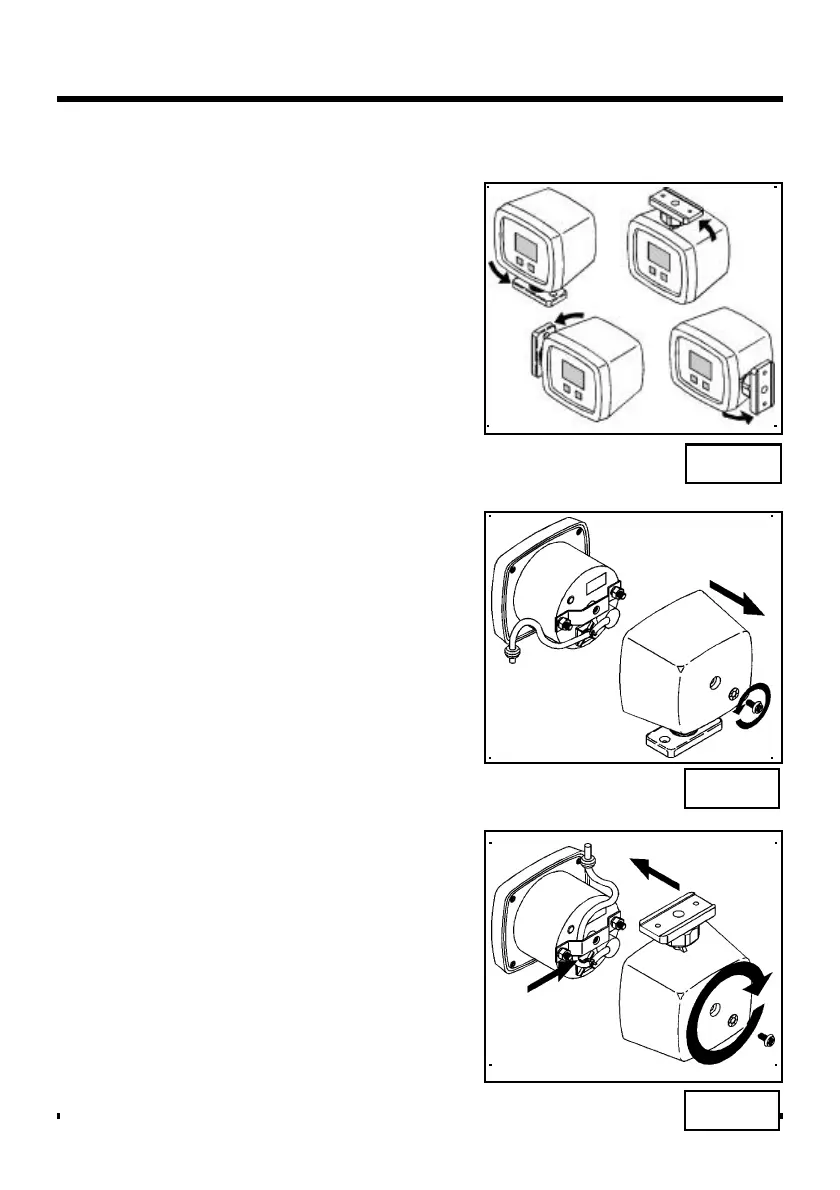
The head unit can be mounted in any
of the positions shown (fig. 18). The
instrument is supplied as standard for
mounting on a horizontal surface. To
rotate the position of the mounting
foot, proceed as follows;
Unscrew the M6 pan head screw on
the back of the instrument and remove
the outer plastic casing (fig. 19).
Rotate the outer casing and refit to the
instrument, taking care to fit the
instrument lead and rubber grommet
back into the slot on the casing (fig.
20).
Fig. 18
Fig. 19
Fig. 20



 To Next Page