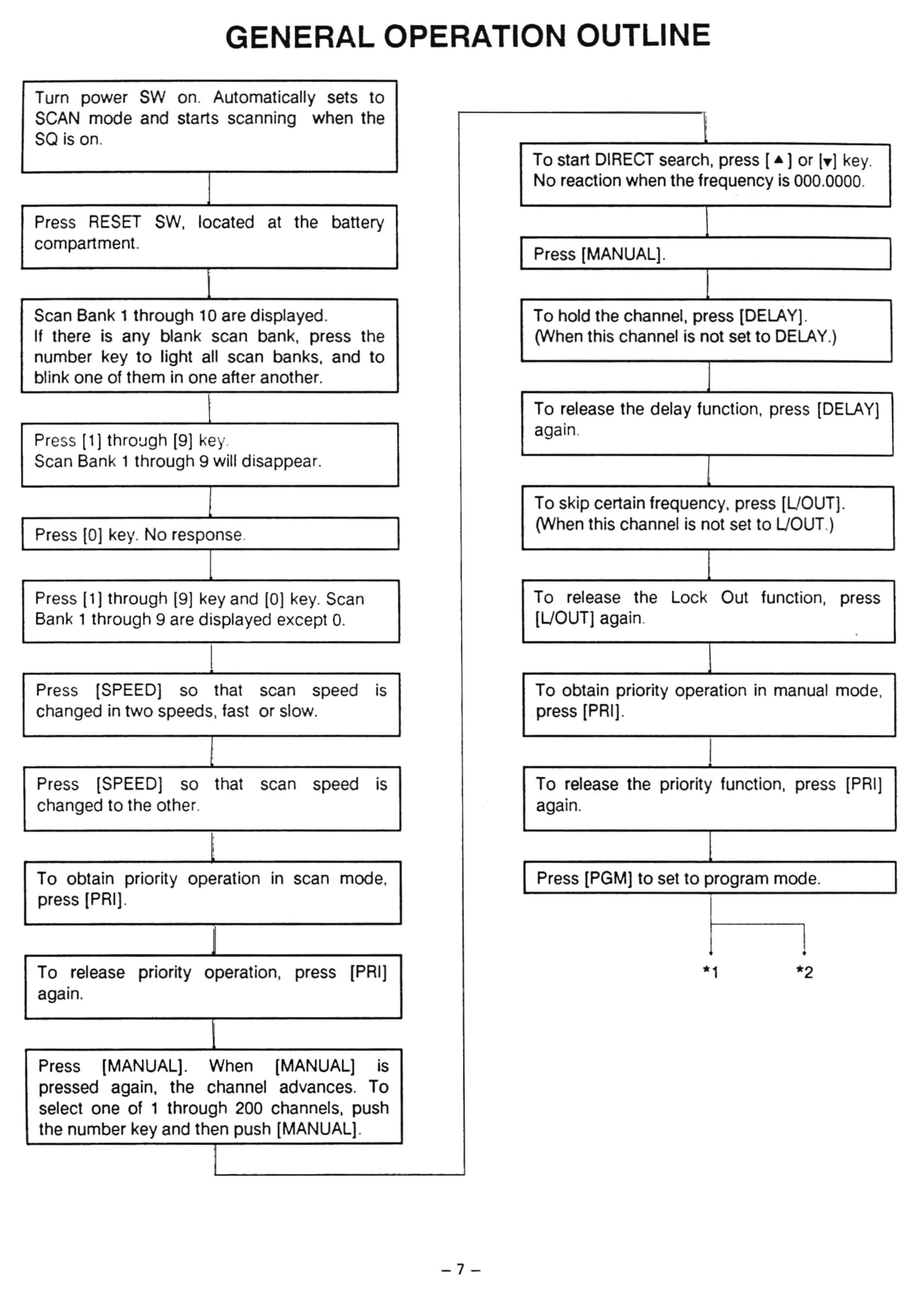
GENERAL OPERATION OUTLINE
Turn power SW on. Automatically sets
to
SCAN
mode
and starts scanning
when the
sa is on.
To sta
rt
DI
RECT
search, press [
~
] or I
T)
key.
No
reaction when the frequency is 000.0000.
Press RESET
SW,
located at the battery
compartment.
Press [MANUAL].
Scan Bank 1
thro
ugh 10 are displayed.
T
0
ho
ld the channel, press [DELA
Vl
.
If
there is any blank scan bank, press the
(When this channel is not set
to
DELAY.)
number key
to
light all scan banks, and
to
blink one of them in one after another.
To release the delay tunetion. press [DELA
Y]
•
Press [1] throuqh [9]
ke
y.
a
çam
.
Scan Bank 1 through 9 will disappea
r.
To skip certain frequency. press [
UO
UT
].
Press [0] key.
No
res
po
nse.
(When this channel is not set
to
UOUT
.)
Press [1) through
19)
keya
nd [0] key. Scan
T
0 release the Loek Out function,
press
Bank 1 through
9 are displayed excepl
O.
[UOUT] again.
•
I
Press [SPEED] that speed
•
To obtain priority operation in manual
mo
de,
so
scan IS
changed in
two
speeds,
fa
st or s
lo
w.
press [P
RI
].
I
Press
[SPEED]
t
ha
t
speed
•
To
release the priori
ty
tunetion. press
[PR
I]so
scan
IS
changed
to
the other.
•
aqa
m.
T0 obtain priority
operation
•
scan mode,
Press [PGM]
to
set
to
program mode.
In
press [PRI].
•
To release
pr
iority operation,
press
[PRI]
* 1
*2
•
aça
m,
Press
[MANUAL]. When [MANUAL]
•
IS
pressed again, the channel advances.
To
select one of 1 through 200 channels, push
the number key and then push [MANUAL].
-7
-













 To Next Page