EasyManua.ls Logo

Realistic TRC-422A - Microphone Plug and Advanced Usage; Connecting the Locking Microphone Plug; Maximizing Transceiver Performance

Realistic TRC-422A
20 pages
Print Icon
To Next Page IconTo Next Page
To Previous Page IconTo Previous Page
Loading...
bis
Ps,
ice,
"CONNECTING
THE
LOCKING
MIC
PLUG
Your
Transceiver
features
a
new
locking
microphone
connector.
This
a
insures
that
you
won't
accidentally
pull
out
or
loosen
the
plug
connection
(when
extending
the
MIC
cable
while
moving
about).
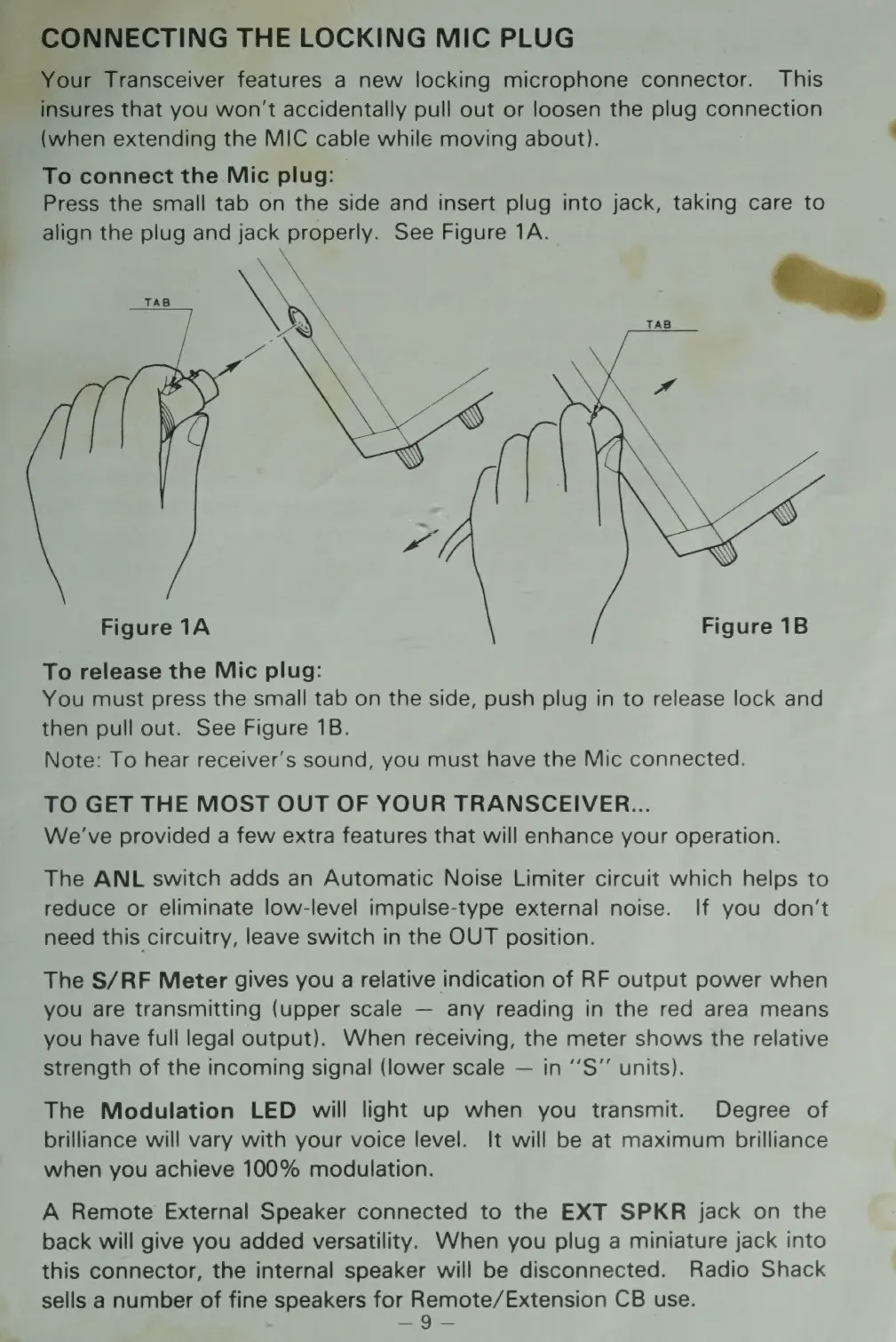
To
connect
the
Mic
plug:
Press
the
small
tab
on
the
side
and
insert
plug
into
jack,
taking
care
to
align
the
plug
and
jack
properly.
See
Figure
1A.
Figure
1A
Figure
1B
To
release
the
Mic
plug:
You
must
press
the
small
tab
on
the
side,
push
plug
in
to
release
lock
and
then
pull
out.
See
Figure
1B.
Note:
To
hear
receiver's
sound,
you
must
have
the
Mic
connected.
TO
GET
THE
MOST
OUT
OF
YOUR
TRANSCEIVER...
We've
provided
a
few
extra
features
that
will
enhance
your
operation.
The
ANL
switch
adds
an
Automatic
Noise
Limiter
circuit
which
helps
to
reduce
or
eliminate
low-level
impulse-type
external
noise.
If
you
don’t
need
this
circuitry,
leave
switch
in
the
OUT
position.
The
S/RF
Meter
gives
you
a
relative
indication
of
RF
output
power
when
you
are
transmitting
(upper
scale
any
reading
in
the
red
area
means
you
have
full
legal
output).
When
receiving,
the
meter
shows
the
relative
strength
of
the
incoming
signal
(lower
scale
in
‘’S”’
units).
The
Modulation
LED
will
light
up
when
you
transmit.
Degree
of
brilliance
will
vary
with
your
voice
level.
It
will
be
at
maximum
brilliance
when
you
achieve
100%
modulation.
A
Remote
External
Speaker
connected
to
the
EXT
SPKR
jack
on
the
back
will
give
you
added
versatility.
When
you
plug
a
miniature
jack
into
this
connector,
the
internal
speaker
will
be
disconnected.
Radio
Shack
sells
a
number
of
fine
speakers
for
Remote/Extension
CB
use.
nag:
Tes

Related product manuals