EasyManua.ls Logo

Realistic TRC-422A - Public Address and Monitor Functions

Realistic TRC-422A
20 pages
Print Icon
To Next Page IconTo Next Page
To Previous Page IconTo Previous Page
Loading...
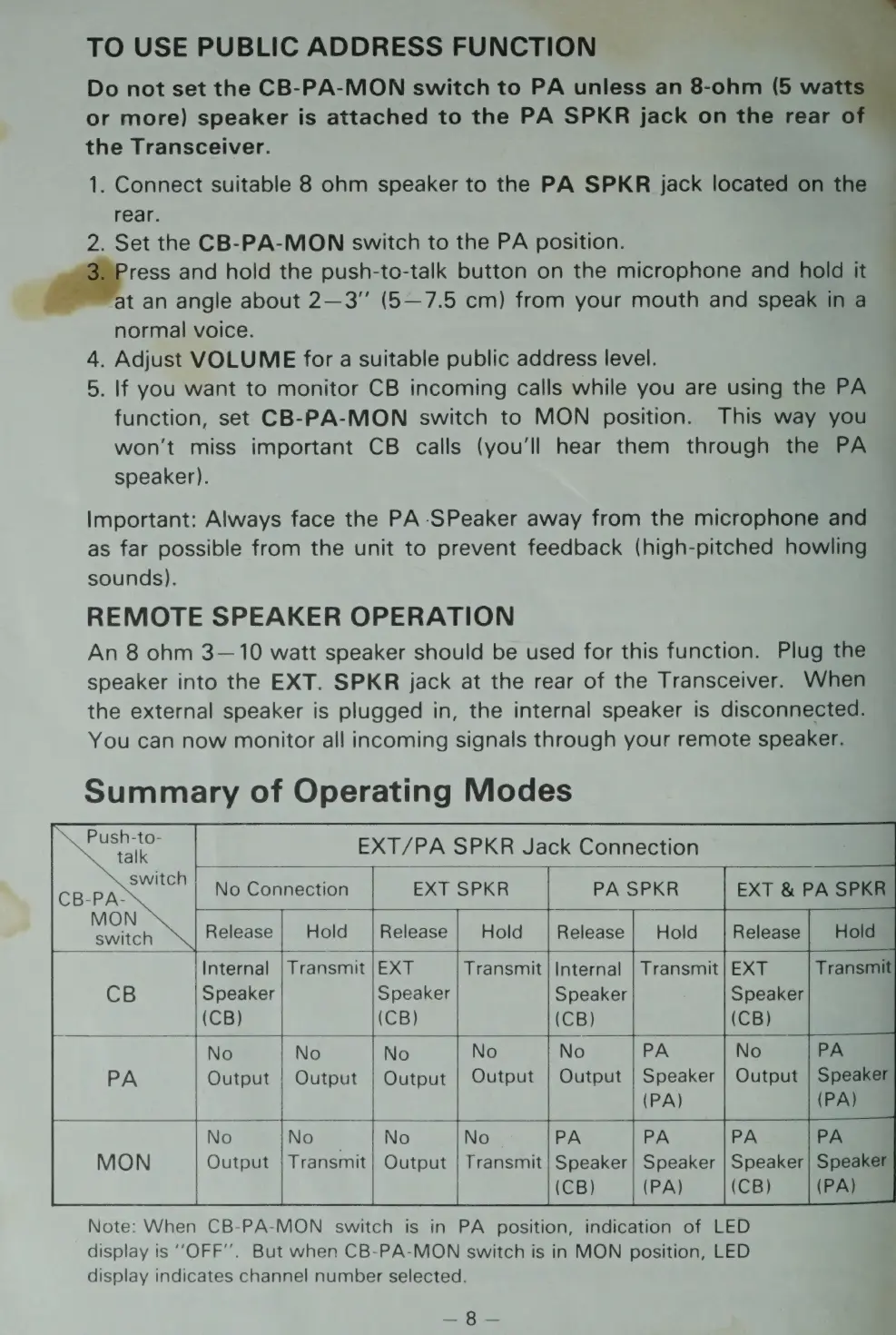
TO
USE
PUBLIC
ADDRESS
FUNCTION
Do
not
set
the
CB-PA-MON
switch
to
PA
unless
an
8-ohm
(5
wa
or
more)
speaker
is
attached
to
the
PA
SPKR
jack
on
the
rear
o
the
Transceiver.
1.
Connect
suitable
8
ohm
speaker
to
the
PA
SPKR
jack
located
on
the
rear.
2.
Set
the
CB-PA-MON
switch
to
the
PA
position.
a
and
hold
the
push-to-talk
button
on
the
microphone
and
hold
it
oY
t
an
angle
about
2—3”
(5—7.5
cm)
from
your
mouth
and
speak
in
a
normal
voice.
4.
Adjust
VOLUME
for
a
suitable
public
address
level.
5.
If
you
want
to
monitor
CB
incoming
calls
while
you
are
using
the
PA
function,
set
CB-PA-MON
switch
to
MON
position.
This
way
you
won't
miss
important
CB
calls
(you'll
hear
them
through
the
PA
speaker).
:
Important:
Always
face
the
PA-SPeaker
away
from
the
microphone
and
as
far
possible
from
the
unit
to
prevent
feedback
(high-pitched
howling
sounds).
REMOTE
SPEAKER
OPERATION
An
8
ohm
3—10
watt
speaker
should
be
used
for
this
function.
Plug
the
speaker
into
the
EXT.
SPKR
jack
at
the
rear
of
the
Transceiver.
When
the
external
speaker
is
plugged
in,
the
internal
speaker
is
disconnected.
You
can
now
monitor
all
incoming
signals
through
your
remote
speaker.
Summary
of
Operating
Modes
Soa
EXT/PA
SPKR
Jack
Connection
switch
No
Connection
EXT
SPKR
PA
SPKR
EXT
&
PA
SPKR
switch
Release
Hold
Release
Hold
Release
Hold
Release
|
Hold
|
Internal
|
Transmit
|EXT
Transmit
|
Internal
|
Transmit
|
EXT
Transmit
CB
Speaker
Speaker
Speaker
(CB)
(CB)
(CB)
No
|No
|No
No
No
Output
|
Output
|
Output
|
Output
|
Output
|
Speaker
(PA)
i?
No
NO
Mie
No
No
PA
Output
|
Transmit]
Output
|
Transmit}
Speaker
(CB)
Note:
When
CB-PA-MON
switch
is
in
PA
position,
indication
of
LED
display
is
‘‘OFF’’.
But
when
CB-PA-MON
switch
is
in
MON
position,
LED
display
indicates
channel
number
selected.
ngs
«Sy

Related product manuals