8
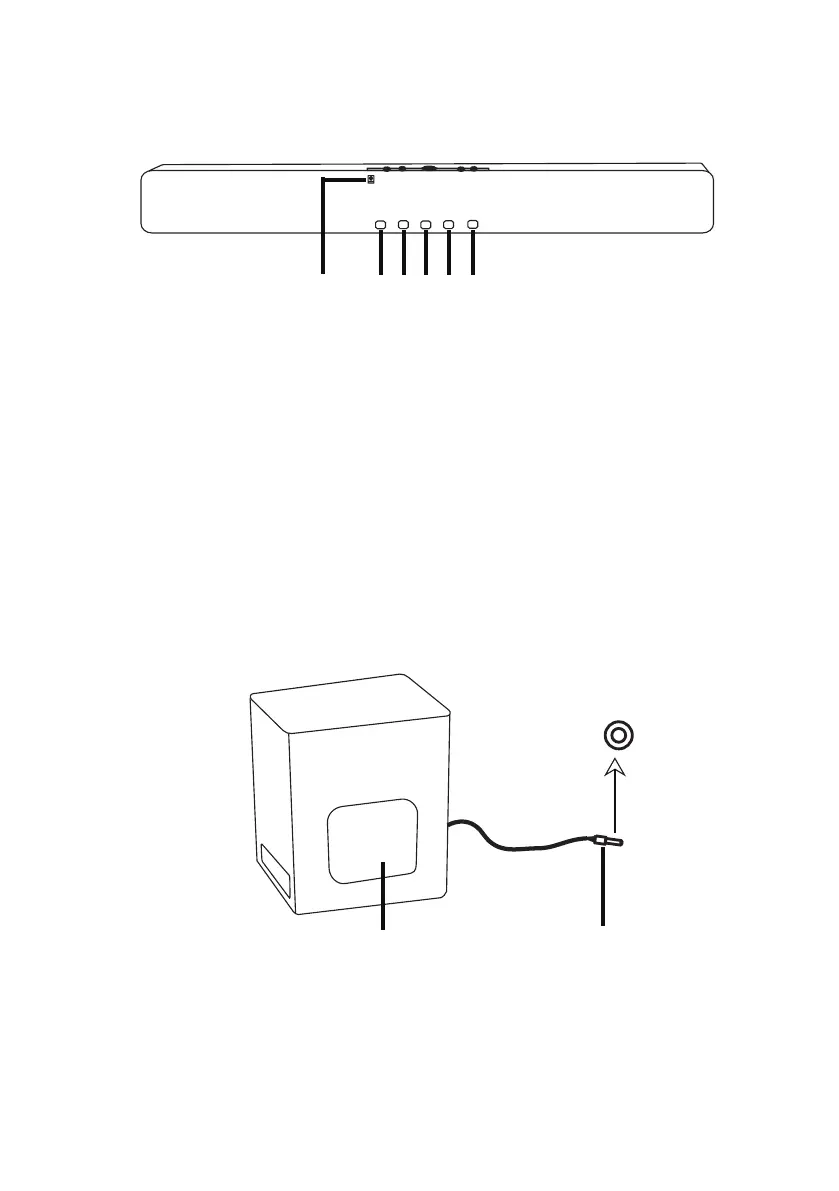
FRONT VIEW
13 14 15 16 17 18
13. Remote sensor: for remote control
15. LED indicator 2: ARC mode, light blue
16. LED indicator 3: blinking green for indicating volume level, it will turn red
17. LED indicator 4: optical mode,light blue
18. LED indicator 5: AUX in mode,light blue
14. LED indicator 1: bluetooth mode, blinks blue for pairing, stay blue when
connected successfully.
while the unit enters standby mode.
NOTE: when LED 1 and LED 2 light blue, it indicates USB mode.
when LED 4 and LED 5 light blue, it indicates coaxial mode.
SUBWOOFER
19
20
19. Speaker
20. Cable plug: insert to the SUB jack on the rear panel for amplification.
SUB


 To Next Page