7
PRODUCT OVERVIEW
M
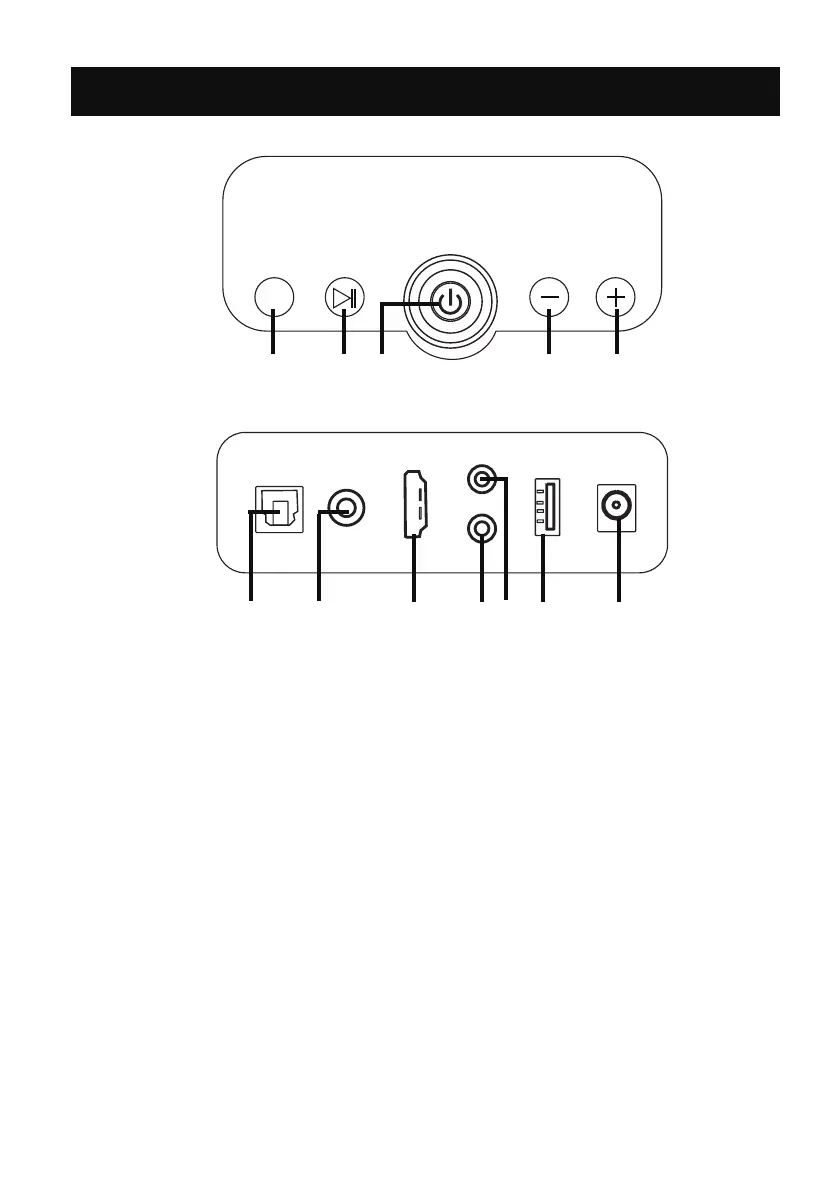
TOP PANEL
REAR PANEL
OPT
COAX
ARC
USB
AUX
POWER
SUB
DC IN
6 7 8 9 10 11 12
1 2 3 4 5
2. Play/Pause button: press to play or pause.
6. Optical in jack
7. Coaxial jack
8. ARC in jack
9. Subwoofer out jack
10. AUX in jack
11. USB slot
12. DC IN jack
4. Volume down button: press and hold to decrease the volume level, press
to skip to previous track.
5. Volume up button: press and hold to increase the volume level, press to
skip to next track.
1. Mode button: press repeatedly to switch to bluetooth, ARC, USB, optical,
AUX in or coaxial mode.
3. Power on/o button: press to power on or o.


 To Next Page