27
9. Maintenance
Cleaning the SC4
If the chuck is an insert version, remove the blind set
screw and protective leather disc which secure the insert
to the chuck body.
Warning: Failure to do so can cause damage to
the insert thread.
Remove the chuck insert. This is not absolutely necessary
but doing so will improve access to the chuck’s backing
plate.
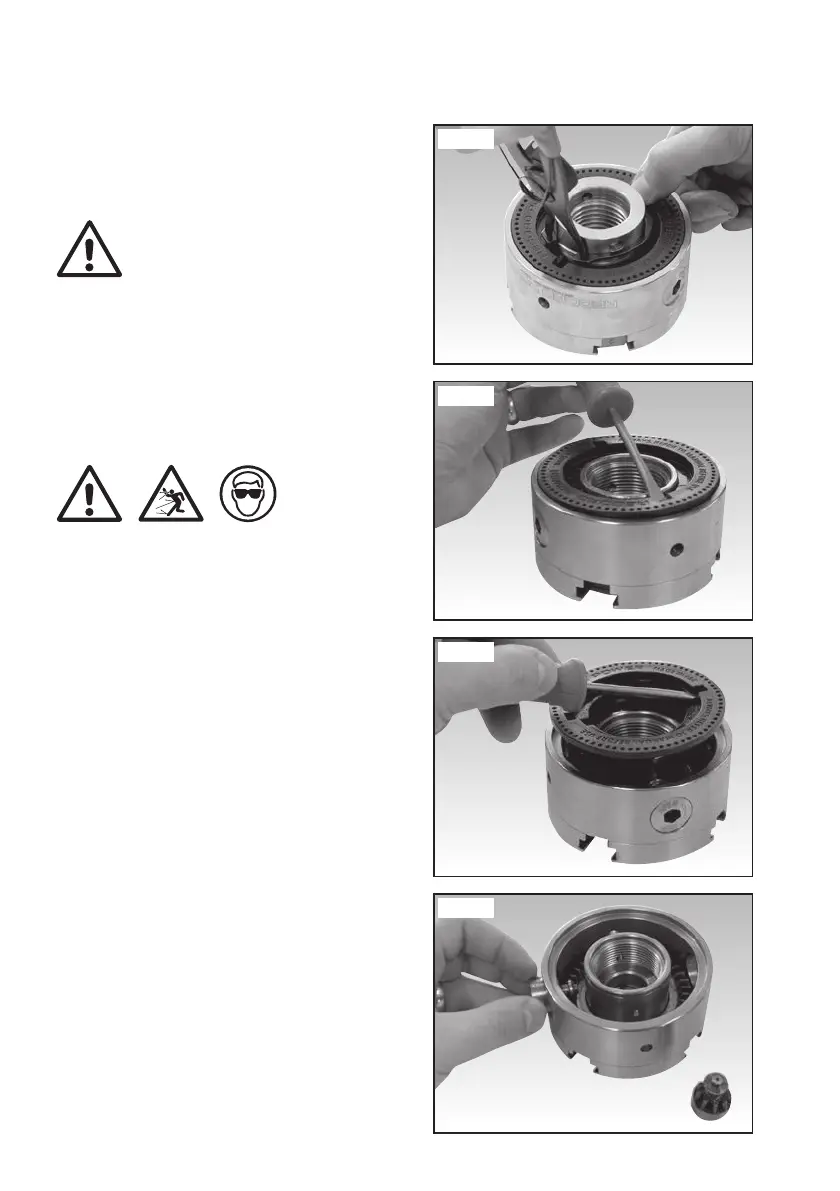
Remove the circlip which holds the backing plate in the
chuck body using a pair of circlip pliers as shown in Fig
9.7.
Warning: Wear eye protection when removing
the circlip as it may fly from the pliers.
To remove the chuck’s backing plate, place a flat head
screwdriver into one of the notches as shown in Fig
9.8 and carefully lift to release the plate. It may also be
necessary to raise the plate using the opposite notch to
gain sufficient leverage.
Once loosened, carefully remove the backing plate as
shown in Fig 9.9.
Remove the pinions as shown in Fig 9.10. This can be
done either by hand or using a flat head screwdriver or
similar implement.
Fig 9.7
Fig 9.8
Fig 9.9
Fig 9.10
SC3 & SC4 Manual 3.7.indd 27SC3 & SC4 Manual 3.7.indd 27 22/04/2022 13:06:1022/04/2022 13:06:10



 To Next Page