1
3.80 (96.52)
(49.53)
(2.54)
(44.45)
3.60 (91.44)
4.14 (105)
1.95
0.10
1.75
1
3
2
4
COUNT, DUAL COUNTER WITH MATH FUNCTIONS
RATE, DUAL RATE WITH MATH FUNCTIONS
SLAVE DISPLAY
UNIVERSAL AC/DC POWER SUPPLY
6 / 9 DIGIT DUAL LINE/TRI-COLOR DISPLAY WITH 0.71" & 0.35"
DIGITS
10 POINT RATE SCALING FOR NON-LINEAR PROCESSES
PROGRAMMABLE UNITS DISPLAY
BUS CAPABILITIES; DEVICENET, MODBUS, AND PROFIBUS-DP
BUILT-IN USB PROGRAMMING PORT ENABLING UNIT
CONFIGURATION WITH CRIMSON PROGRAMMING SOFTWARE
NEMA 4X/IP65 SEALED FRONT BEZEL
DESCRIPTION
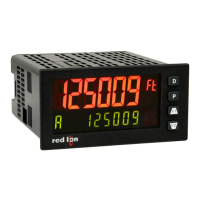
The PAX2D Digital Panel Meter offers many features and performance
capabilities that are not available on standard panel meters. The basic meter is a
dual counter and dual rate meter all in the same package. A third counter and
third rate display allows the user to do simple math functions. The optional plug-
in output cards allow the opportunity to configure the meter for present
applications, while providing easy upgrades for future needs.
Highlighting the PAX2D is a dual line, display with a large 0.71" tri-color 6
digit top display line and a 0.35", 9 digit green bottom display line. The meter
also offers programmable units display providing capability to tag the display to
the units of measure. Display color change capability provides machine
operators a visual indication of changing conditions, even when the operator is
not close enough to read the actual display value. In addition, a universal power
supply provides the ultimate in flexibility for both AC and DC inputs.
The meter accepts digital inputs from a variety of sources including switch
contacts, outputs from CMOS or TTL circuits, magnetic pickups and all
standard RLC sensors. The meter can process directional, uni-directional or
Quadrature signals simultaneously. The meter accepts input signals up to 50
KHz maximum depending on the count mode and function configurations
programmed. Each input signal can be independently scaled to various process
values.
The meter provides a MAX and MIN rate reading memory with programmable
capture time. The capture time is used to prevent detection of false max or min
readings which may occur during start-up or unusual process events.
The meter has up to four setpoint outputs, implemented on plug-in option
cards. The plug-in cards provide dual FORM-C relays, quad FORM-A, or either
quad sinking or quad sourcing open collector logic outputs. The setpoint alarms
can be configured to suit a variety of control and alarm requirements.
The PAX2 can be programmed to utilize Modbus protocol. With Modbus, the
user has access to most configuration parameters. Readout values and setpoint
alarm values can be controlled through the bus. Additionally, the meter has a
feature that allows a remote computer to directly control the outputs of the
meter. Communication and bus capabilities are also available as option cards.
These include RS232, RS485, DeviceNet, and Profibus-DP.
The PAX2 includes a built-in USB programming port. With a Windows
®
based program, made available by Red Lion Controls, configuration data can be
downloaded to the PAX2 without the need of any additional option cards.
A linear DC output signal is available as an optional plug-in card. The card
provides either 20 mA or 10 V signals. The output can be scaled independent of
the input range and can track any of the counter, rate, max or min displays, or
any setpoint value.
Once the meter has been initially configured, the parameter programming
may be locked out from further modification in its entirety, or only selected
values can be made accessible for quick entry.
The meter has been specifically designed for harsh industrial environments.
With NEMA 4X/IP65 sealed bezel and extensive testing of noise effects and CE
requirements, the meter provides a tough reliable application solution.
SAFETY SUMMARY
All safety related regulations, local codes and instructions that appear in this
literature or on equipment must be observed to ensure personal safety and to
prevent damage to either the instrument or equipment connected to it. If
equipment is used in a manner not specified by the manufacturer, the protection
provided by the equipment may be impaired. Do not use this unit to directly
command motors, valves, or other actuators not equipped with safeguards. To do
so can be potentially harmful to persons or equipment in the event of a fault to
the unit.
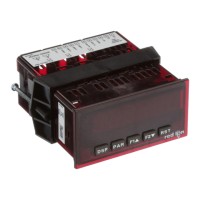
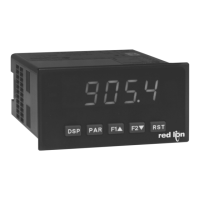
MODEL PAX2D – 1/8 DIN DIGITAL INPUT PANEL METER
DIMENSIONS In inches (mm)
Note: Recommended minimum clearance (behind the panel) for
mounting clip installation is 2.1" (53.4) H x 5.5" (140) W.
Bulletin No. PAX2D-A
Drawing No. LP0872
Released 01/12
Tel +1 (717) 767-6511
Fax +1 (717) 764-0839
www.redlion.net
CAUTION: Risk of Danger.
Read complete instructions prior to
installation and operation of the unit.
CAUTION: Risk of electric shock.


 To Next Page

 General