GUI- 003 Knowledge Base- Resetting your Redback Inverter
Audience: Home owner Installer .
Version 1.0 - 27/07/2018 - Page 7 of 16
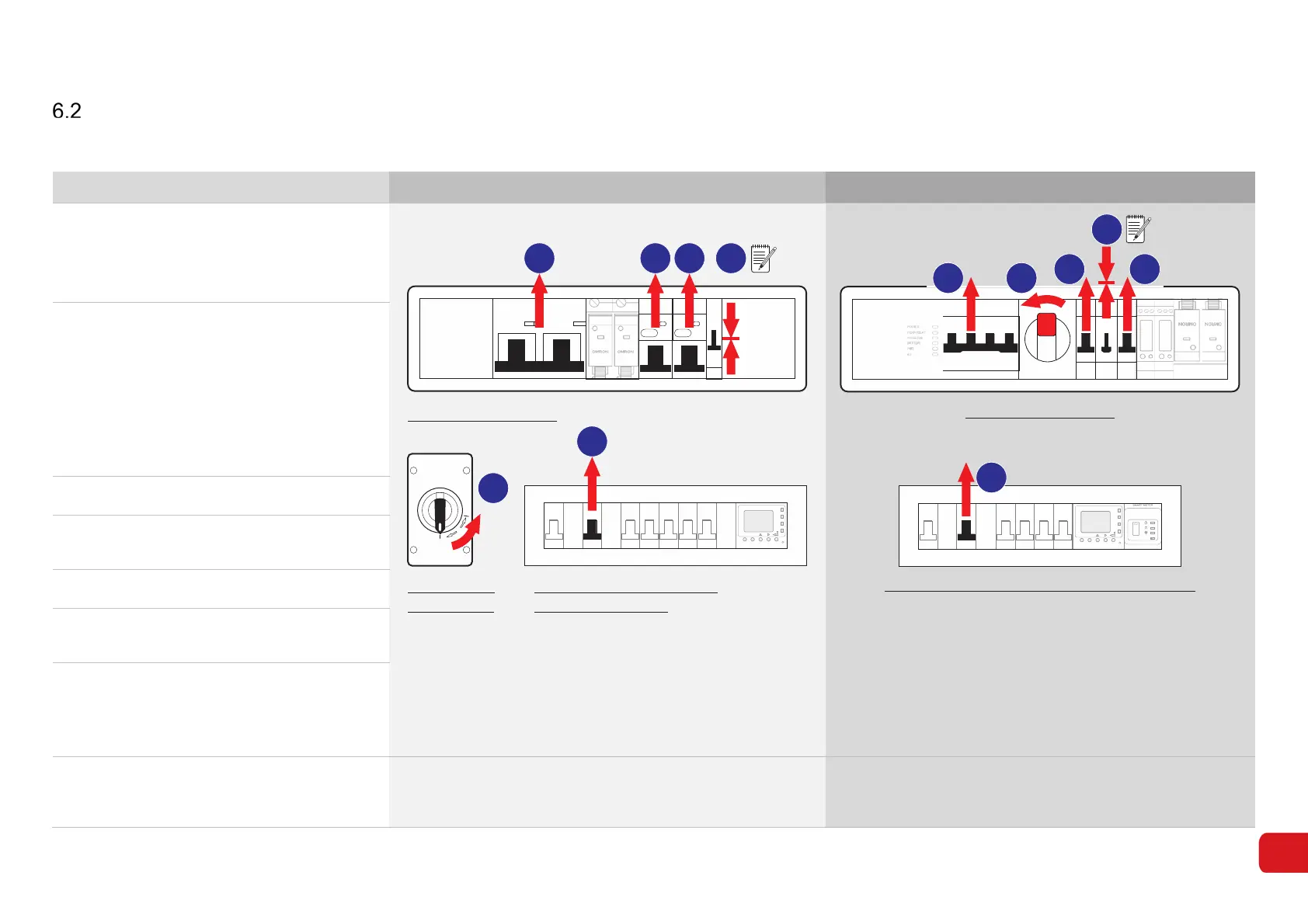
Hard reset (Restart)
A hard reset completely powers-down the inverter and disconnects all inputs.
Step Procedure SH4600 (Gen 1) SH5000 (Gen 2)
1.
Open the access panel on the front of the
inverter.
Switch the UTIL GRID circuit breaker to
OFF (UP).
PV ARRAY
DC ISOLAT OR
ON
OFF
ON
MSB/MDB
Acrel
Run
Com
R _P
FN S et
OMRON OMRON
4600
ABB
NOARKNOARK
Nader
ON
OFF
6
5
4
3 21
MAIN SWITCH BOARD
OR SUB-BOARD
SH4600 INVERTER
SOLAR PV
ISOLATOR
Acrel
Run
Com
R _P
FN S et
Reset
6
POW ER
HEA RTBEAT
INVERT ER
BATTERY
WIFI
4G
OMRON
OMRON
2
1
4
3
5
MAIN SWITCH BOARD or SUB-BOARD
SH5000 INVERTER
2.
Identify the three-position By-Pass switch.
Note the position of the switch.
☐ Up ☐ Down
Note: The switch must be returned to the
original position during restart.
Switch the By-Pass to OFF (middle
position).
3. Switch the BACKUP circuit breaker to OFF.
4.
Switch the SOLAR PV Isolator to OFF
(SH4600 is located next to the inverter).
5. Switch the BATTERY circuit breaker OFF.
6.
Turn the Solar Supply Main Switch OFF (on
the Main Switch Board or Sub-board)
7. To restart the system:
• Turn all the inverter switches ON in
reverse order i.e. 5,4,3,2,1
• Turn the Solar Main Switch ON (6).
8.
The Inverter will resume normal operation in
approximately 10 minutes, indicated by the
Status LEDs.
SYSTEM: Green, ON
COMMUNICATIONS: Yellow, ON
SYSTEM: Green, ON
COMMUNICATIONS: Yellow, ON
WI-FI: Blue, ON



 To Next Page