GUI- 003 Knowledge Base- Resetting your Redback Inverter
Audience: Home owner Installer .
Version 1.0 - 27/07/2018 - Page 11 of 16
Connecting the inverter to your Wi-Fi (Apple iOS devices, Redback app installed)
To reconnect the inverter, you need the following information:
Your home Wi-Fi network name No idea? Look on your router. Your inverter serial number On the side of your inverter
Your home Wi-Fi password No idea? Look on your router. Your inverter Wi-Fi identity XX Discover in Step 3, below.
Step Procedure iOS
1.
Stand beside your inverter (to ensure
strong reception)
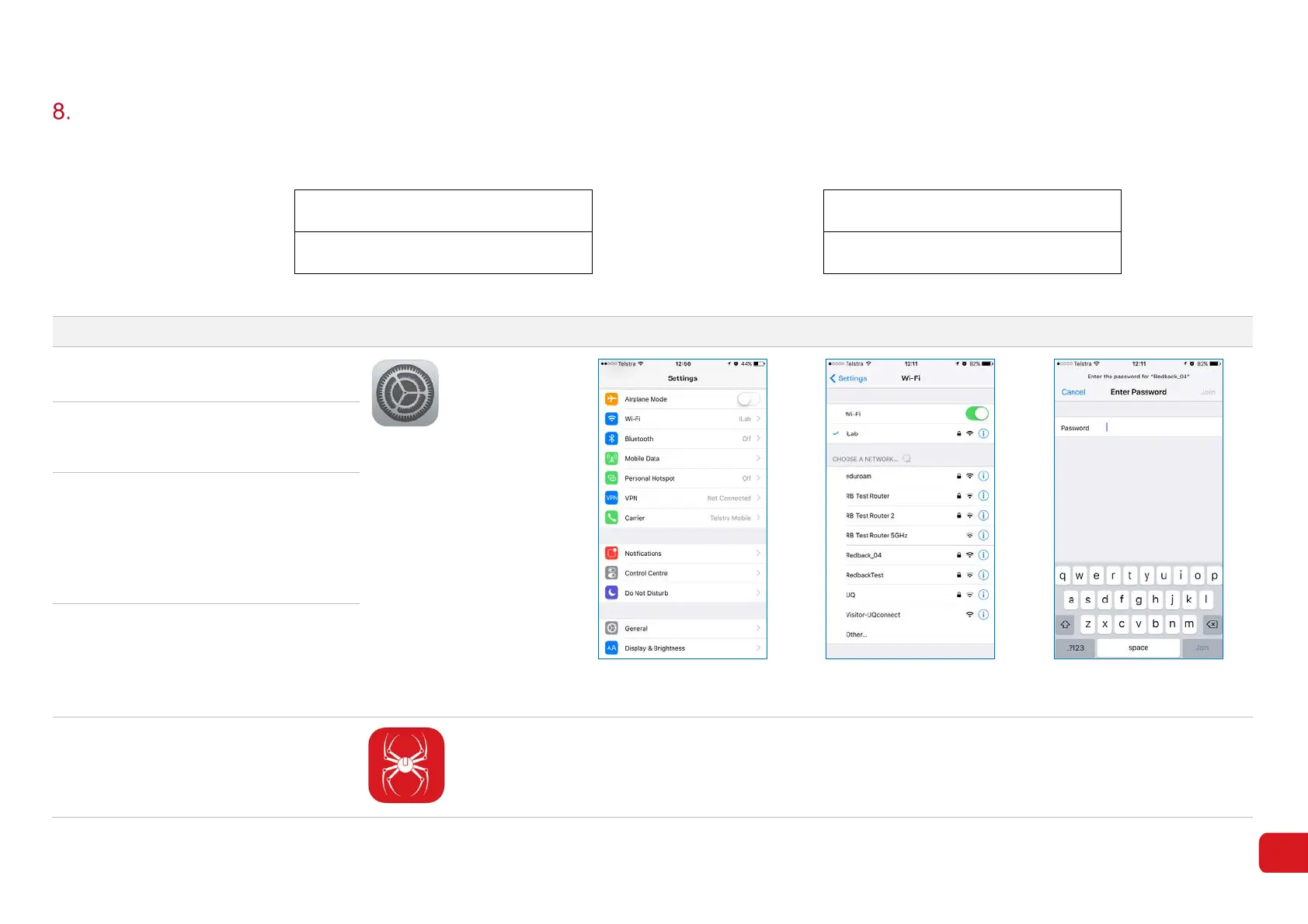
Figure 8-1
Figure 8-2
Figure 8-3
2.
On your iOS device, open Settings.
Touch Wi-Fi (Figure 8-1). A list of Wi-
Fi networks will appear.
3.
Select Redback_XX e.g. Redback_04.
If there is more than one Redback
listed, choose the one with strongest
reception.
Make a note of the Inverter number
(XX).
4.
Enter password 12345678 and touch
Join. (8-3). Wait for the confirmation
message.
There is no need to close Settings.
5. Open the Redback App.



 To Next Page