GUI- 003 Knowledge Base- Resetting your Redback Inverter
Audience: Home owner Installer .
Version 1.0 - 27/07/2018 - Page 12 of 16
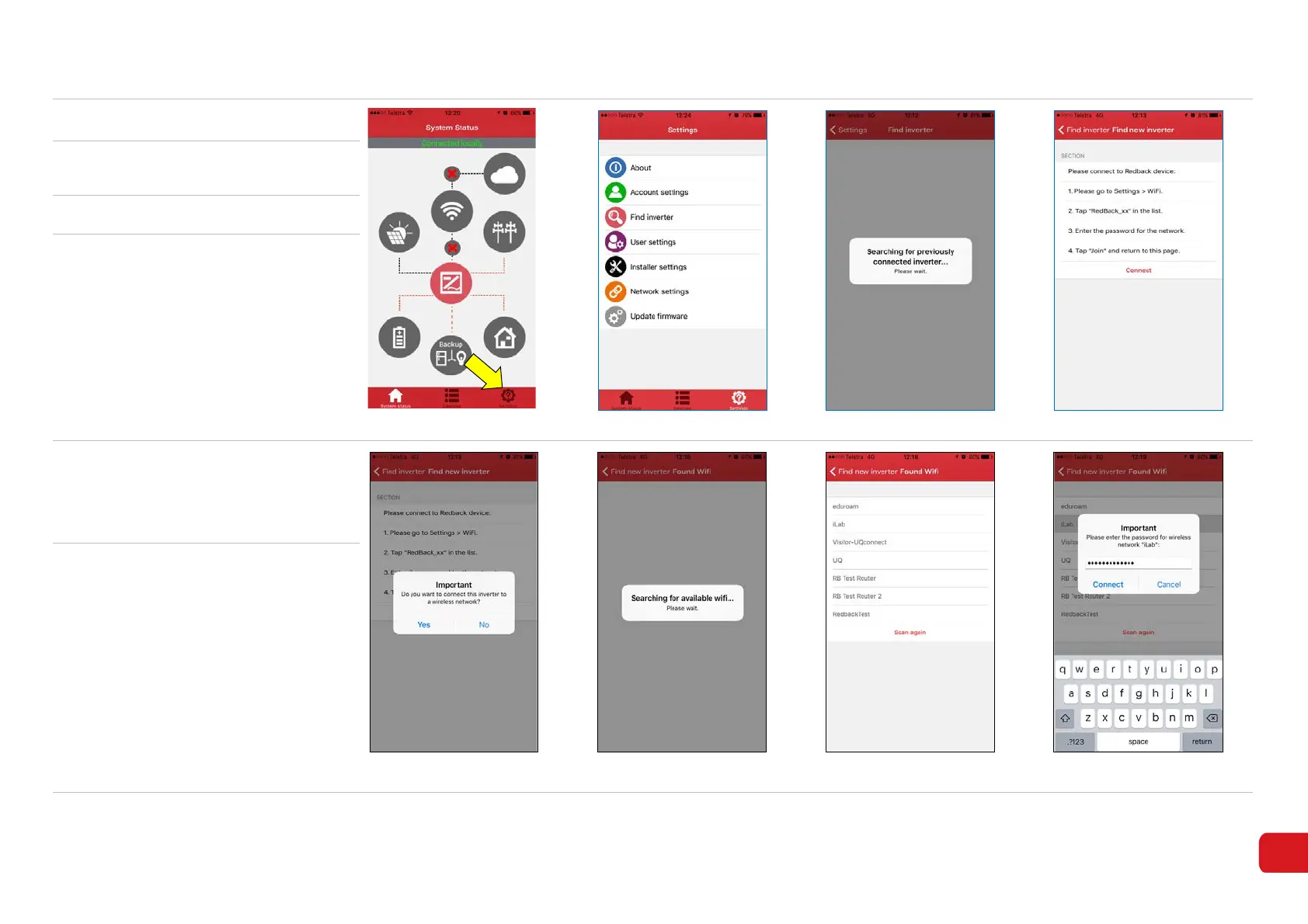
6. Touch the Settings Icon (8-4).
Figure 8-4
Figure 8-5
Figure 8-6
Figure 8-7
7.
Touch Find Inverter. The app will
search for the inverter (8-5).
8. Touch on Find new inverter (8-6)
9. Touch red Connect (8-7)
If ‘Connect’ is grey, you are not
connected to the Redback Wi-Fi
access point: Return to the Wi-Fi
settings on your device and connect
again.
10.
You may receive a message “Result –
‘Failed to find Wi-Fi list”. Touch OK.
You may need to Connect to force the
App to repeat the search for the home
Wi-Fi.
Figure 8-8
Figure 8-9
Figure 8-10
Figure 8-11
11.
If Wi-Fi networks are detected a
message “Important. Do you want to
connect etc?” is displayed. Touch Yes
to continue (8-8).
The “Found Wi-Fi” opens and
indicates search in progress (8-9).
A list of available networks will appear
(8-10).
Select your home Wi-Fi network.
Enter the Password when requested
(8-11).



 To Next Page