GUI- 003 Knowledge Base- Resetting your Redback Inverter
Audience: Home owner Installer .
Version 1.0 - 27/07/2018 - Page 8 of 16
Connecting the inverter to your Wi-Fi (Android devices, Redback App installed)
To reconnect the inverter, you need the following information:
Your home Wi-Fi network name No idea? Look on your router. Your inverter serial number On the side of your inverter
Your home Wi-Fi password No idea? Look on your router. Your inverter Wi-Fi identity Discover in Step 3, below.
1.
Stand beside your inverter (to ensure strong
reception). Open the Redback App.
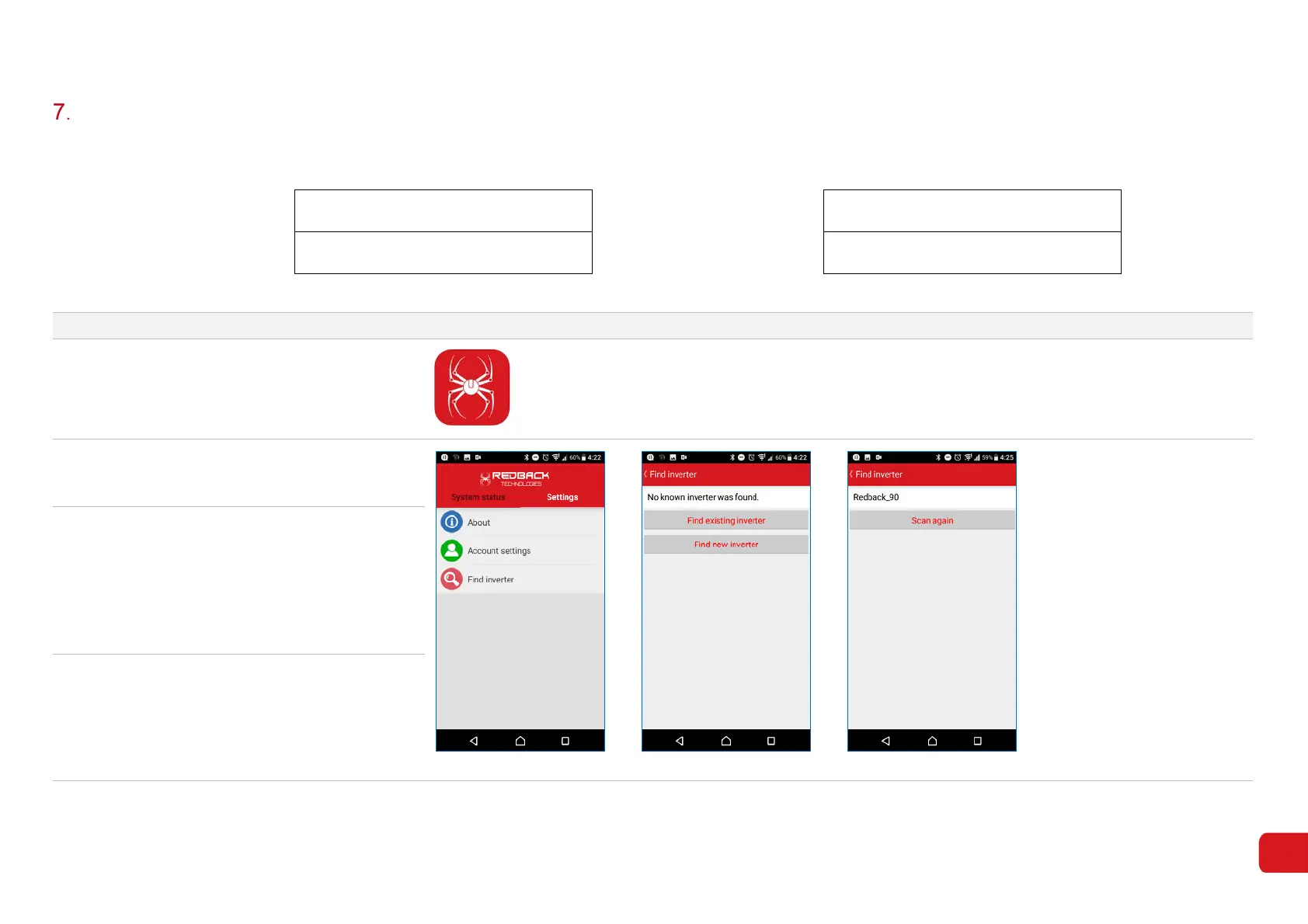
2. Touch Settings to reveal options (7-1).
Touch Find Inverter.
Figure 7-1 Figure 7-2
Figure 7-3
3. Touch Find New Inverter (7-2)
You may receive a message: “Cannot connect to
the inverter. Please make sure you have
connected to the correct Wi-Fi access point”
Touch OK. You may need to select Scan again
to get the app to search for the inverter once
more.
4.
When discovered, your inverter should appear as
shown in 7-3.
Touch Redback_XX to continue.



 To Next Page