service@redliro.com service@redliro.com
8
9
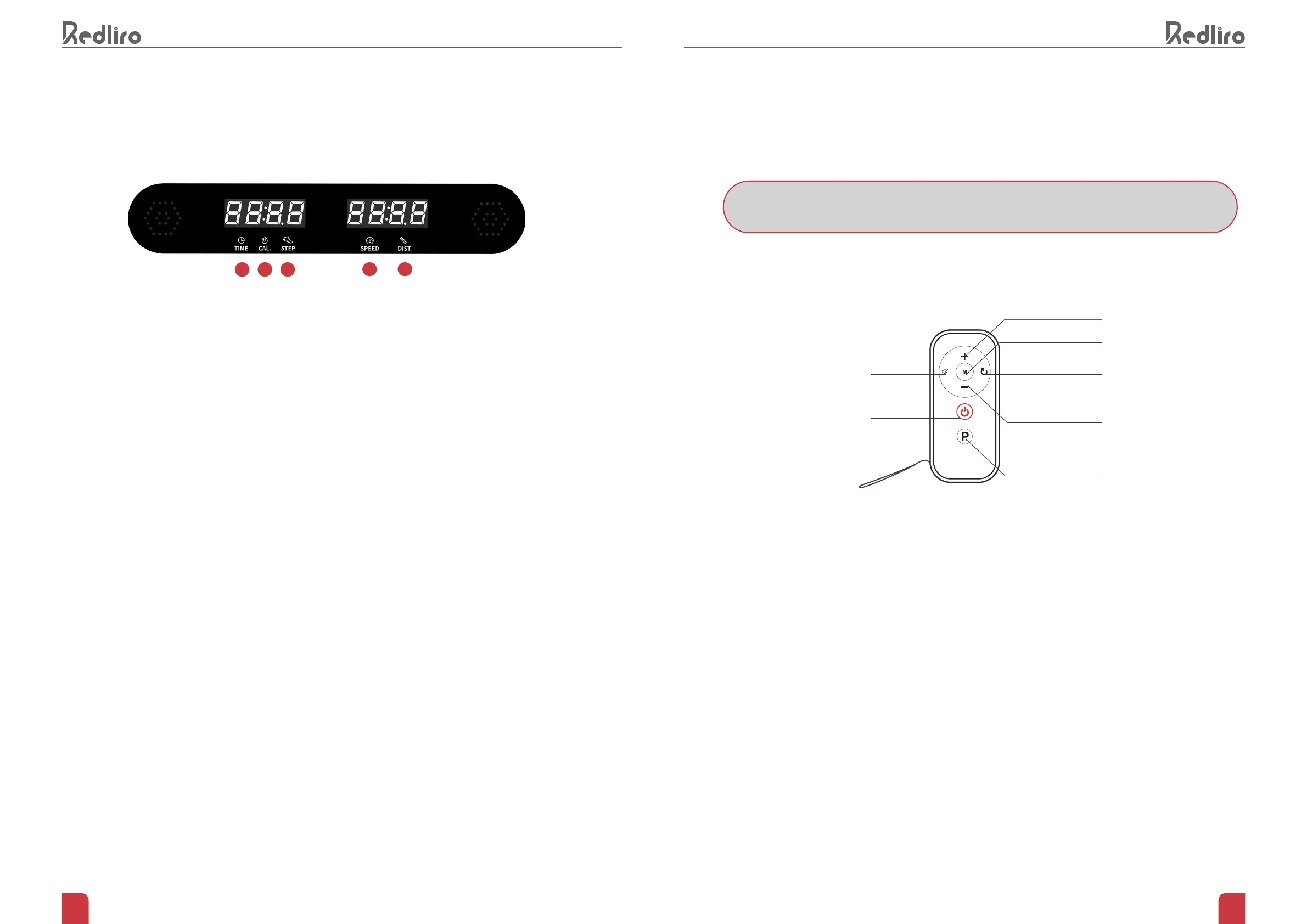
INTRODUCTION TO DISPLAY
1.
The “
TIME
” window has two display modes.
• Standard mode counts from 00:00 ~ 99:00 and resets to 0 when it reaches 99:00.
• The preset/custom mode allows user to set a time for length of use. Select from 5 minutes to 99 minutes.
Once countdown has reached 0, your device will slowly stop and enter standby mode.
2.
The "
CALORIES
" window has two display modes.
• Standard mode counts from 0 to 999.9, and resets to 0 when it reaches 999.9.
• The preset/custom mode allows user to set calorie value. Select from20 to 990. Once countdown has
reached 0, your device will slowly stop and enter standby mode.
3.
The “
STEP
” window displays the number of steps taken. The count is 0~9999 steps. When the step count
reaches 9999, it will reset to 0.
4.
The "
SPEED
" window displays the current running speed, and the speed range is 0.5mph~4mph.
• In preset mode, 12 preset schemes (P1 ~ P12) are displayed.
5.
The "
Distance
" window has two display modes.
• In standard mode, the distance will increase from 0.0 to 99 miles, and the count will reset to 0 when it
reaches 99
• In preset/custom mode, the distance will be reduced from the inputted data (setting range: 1~99 miles) to 0.
When the display is 0, your device will slowly stop and enter the standby state.
1 2
4
3
5
REMOTE CONTROL INSTRUCTIONS
HOW TO ESTABLISH A NEW CONNECTION
1.
Ensure the treadmill is connected to the power source but keep it powered on.
2.
Hold the Mute button and Reset buttons on the remote control simultaneously for 5 seconds. The light on
the remote control will ash as it enters pairing mode.
3.
The remote control will pair with treadmill automatically after a few seconds.
Increase Speed
Mode
ResetMute
Start / Stop
Reduce Speed
Programs
NOTE: TO USE THE REMOTE CONTROL, YOU MUST FIRST ESTABLISH A NEW CONNECTION


 To Next Page