h t t p : / / w w w . h f l a s e r . c o m
5·Spring switch 6·Cover
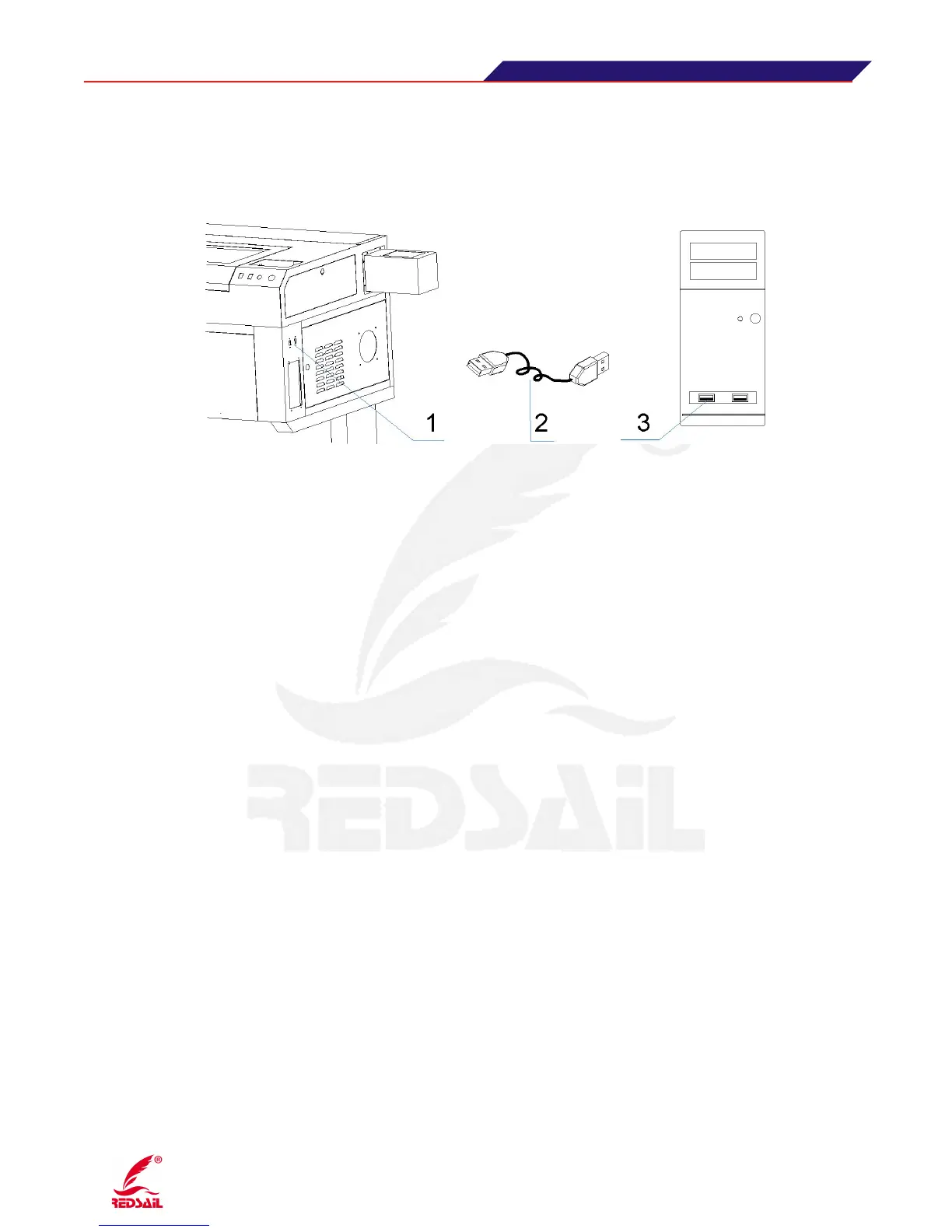
3.7 Connection of USB Cable
Please connect the two ends of the USB Cable (which came along with the machine) with the
USB port of control board in the machine and computer.(Figure 6)
( Figure 7)
Note:1·Device USB port 2·USB cable 3·Computer USB port
This system supports offline work, here is the way: By downloading the parameters of the file in the
software to the USB flash memory, then plug the USB flash memory into the USB port of the
equipment. (like shown in the above figure), with the guide of the notice showed in the LCD control
panel, you can directly send the data into the motherboard, finish the downloading and make the
offline work.
4.1·Software Installation and Operation
Before installing the software, please turn on the power(before turn on the power, please must check if
the power is normal, water circulation is ok, connect USB cable), please copy all content in CD to
your computer as spare. And refer to “User Manual for Controller” to install it step by step.
Before using the device, please read this user manual and the control system user manual carefully,
know all functions for the software, please refer to the control system user manual for the detail
operation.
4.2 Adjustment of Optical Path
After connecting all accessories of the machine, please switch on the power of water cooler (in front
of water cooler), when the water inside the laser tube circulate normally, then please switch on the
machine(including Leakage protector,Emergency switch and General supply switch)
Optical path adjustment:
Adjusting laser beam is the important step in use. After finishing of the adjusting
for optical path, you can engrave and cut sample.
Optical path adjustment directly affects the quality of engraving and cuttin. Now just make the
explaination for one of optical path.


 To Next Page