reedinstruments
w ww
c om
11
Pantone 534 Blue
Pantone 123 Yellow
Pantone 485 Red
Pantone 123 Yellow
Pantone 534 Blue
Black
Rich Black -
20/20/20/100
Blue - 100/80/30/5
Yellow - 0/27/100/0
Red - 10/100/100/5
Yellow - 0/27/100/0
Blue - 100/80/30/5
Only if you REALLY need them:
Pantone 534 Blue - 100/80/30/5
Pantone 485 Red - 10/100/100/5
Pantone 123 Yellow - 0/27/100/
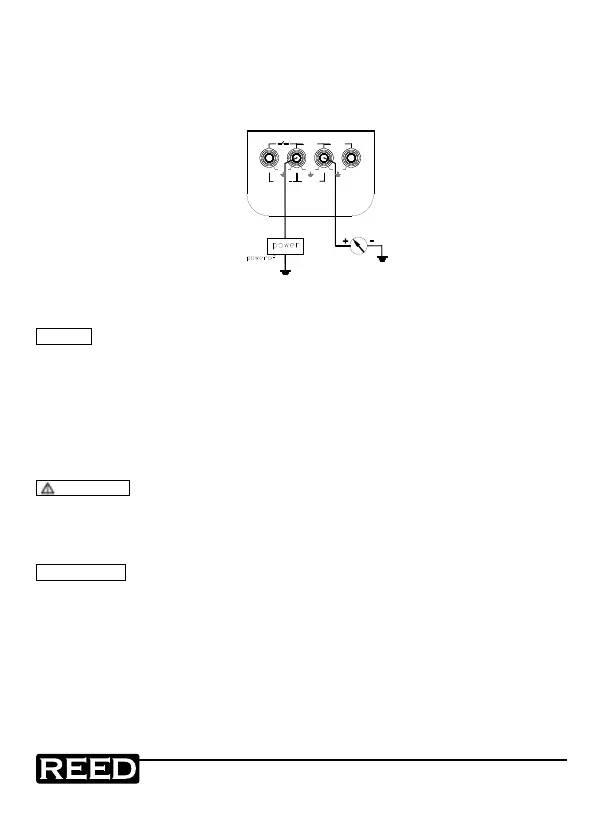
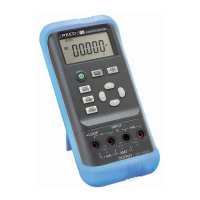
Simulating Transmitter Output (XMT)
1. Insert one end of the test lead to the ‘XMT’ output jack of the
calibrator and connect the other end with the input terminal of the
user’s instrument as shown in the following diagram:
+
+LOOP
30V MAX
OUTPUT
+
mA
XMT
30V
MAX
mA
30V
MAX
30V
MAX
V
INPUT
2. The button-operation is the same as that as indicated in the
Current Output section
NOTE
• Power supply range: 5 to 25VDC
• During an output operation, use a external 24V DC power
supply in order to prolong battery life.
Calibrator Measurement
WARNING
• Never apply more than 30V between any two terminals, or between
any terminal and the ground. Any voltage more than 30V could result
in damage to the calibrator, as well as personal injury.
! CAUTION
• During operation, do not apply a voltage or current exceeding the
measuring range to the input terminal. This could cause damage to
the calibrator.
• During the operation, turn off the instrument before connecting the
calibrator. Connecting to the Calibrator without it being shut it down
may cause damage.
1.800.868.7495info@REED-Direct.ca
REED-Direct.ca


 To Next Page