reedinstruments
w ww
c om
12
Pantone 534 Blue
Pantone 123 Yellow
Pantone 485 Red
Pantone 123 Yellow
Pantone 534 Blue
Black
Rich Black -
20/20/20/100
Blue - 100/80/30/5
Yellow - 0/27/100/0
Red - 10/100/100/5
Yellow - 0/27/100/0
Blue - 100/80/30/5
Only if you REALLY need them:
Pantone 534 Blue - 100/80/30/5
Pantone 485 Red - 10/100/100/5
Pantone 123 Yellow - 0/27/100/
Measuring DC Current
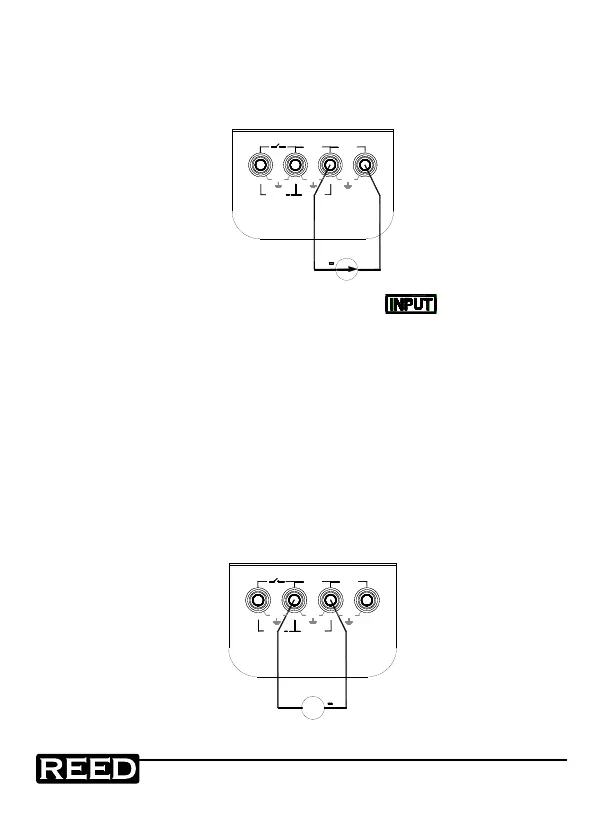
1. Insert one end of the test lead into the mA input terminal and con-
nect the other end to the output of the user’s instrument as shown
in the following diagram:
+
+LOOP
30V MAX
OUTPUT
+
mA
XMT
30V
MAX
mA
30V
MAX
30V
MAX
V
INPUT
2. Press the OUTPUT/IN/SW button when
appears on the
display. It indicates that the calibrator is in an input state.
3. Press the mA%/V button to select mA or %. The value of 0%
indicates 4mA and the value of 100% indicates 20mA.
4. The unit refreshes twice per second. If the measured value
exceeds the measuring range, the display will indicate the symbol
‘-OL-’ (overload).
Measuring DC Voltage
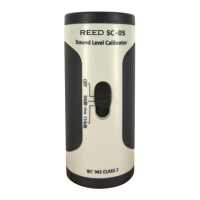
1. Insert one end of the test lead into the V input jack of the
calibrator and connect the other end with the output of the user’s
instrument as show in the following diagram:
+
M
+LOOP
30V MAX
OUTPUT
+
mA
XMT
30V
MAX
mA
30V
MAX
30V
MAX
V
INPUT
1.800.868.7495info@REED-Direct.ca
REED-Direct.ca


 To Next Page