11
s
canning
r
esolution
Color
d
epth
(by
RGB
Channel)
Color
mode
File
s
ize
ti
(no
compres-
sion)
300dpi 8 bit 24-bit ~370
k
b
600dpi 8 bit 24-bit ~1.4mB
1800dpi 8 bit 24-bit ~12.9mB
3600dpi 8 bit 24-bit ~52mB
7200dpi 8 bit 24-bit ~208mB
10000dpi 8bit 24-bit ~402mB
English
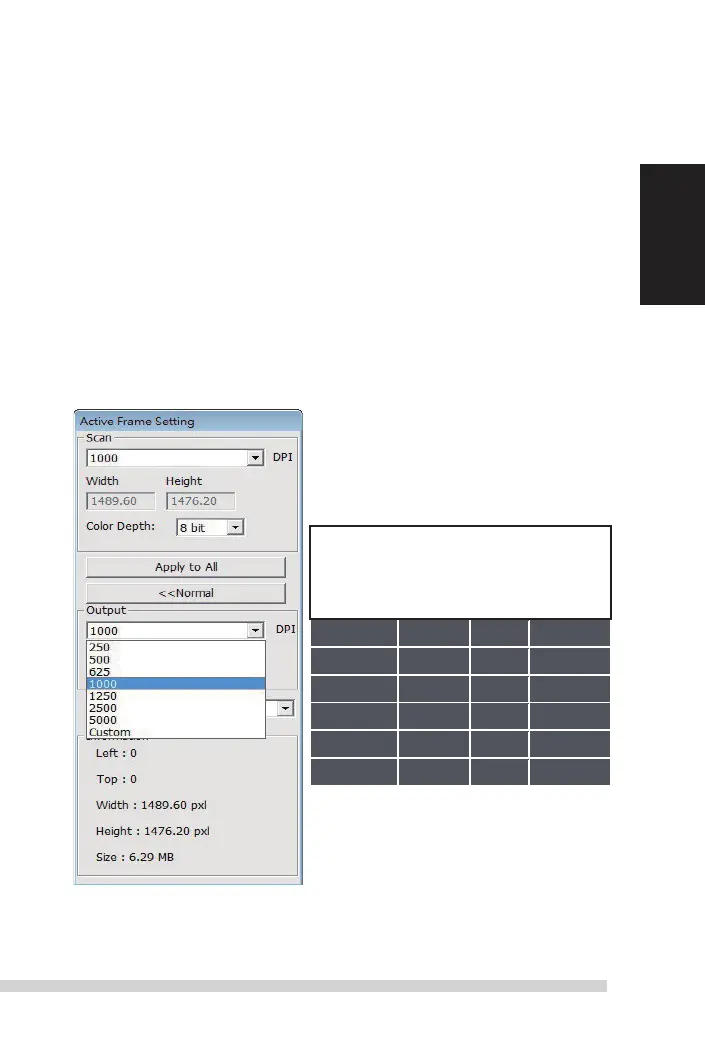
set scan settings (Continued...)
notice: Higher scanning resolutions result in greater scanning time and hardisk space
requirements.
b. Color
d
epth
Choose between 8 and 16bit.
a
higher color depth setting will result in
a larger range of colors in the nal scanned image.
t
he Film scanner color depth is 48 bit true color.
t
he scanning software has the
capability of selecting 8 bit color mode or 16 bit color mode when scanning,
t
his will produce 24 or 48 bit color images, 8 bits or 16 bits per
r
ed, Green and
Blue color channels.
Example:
8 bit mode = 8
Red, 8 Green, and 8 Blue for a total of 24 bit color
16 bit mode = 16 Red, 16 Green, and 16 Blue for a total of 48 bit color
NOTE: make sure there is enough space available
on the computer when changing the
s
canning
r
esolution.
a
high scanning resolution results in
large les that may prove dicult to save.
Color image le size of dierent resolutions
and color depths:
scans include
auto
Balance and digtal
n
oise
r
eduction on:
Processor:
amd
9650 Quad-Core 2.3GHz
memory: 2GB
system type: Vista 64 bit
scan mode – normal mode produces a scan in jpeg format while Quality pro-
duces a non-compressed, “loss-less”
ti
image.
Manual-RPS10M.indd 11 23.12.2016 10:00:31


 To Next Page