24 25
English
Menu Commands - Windows
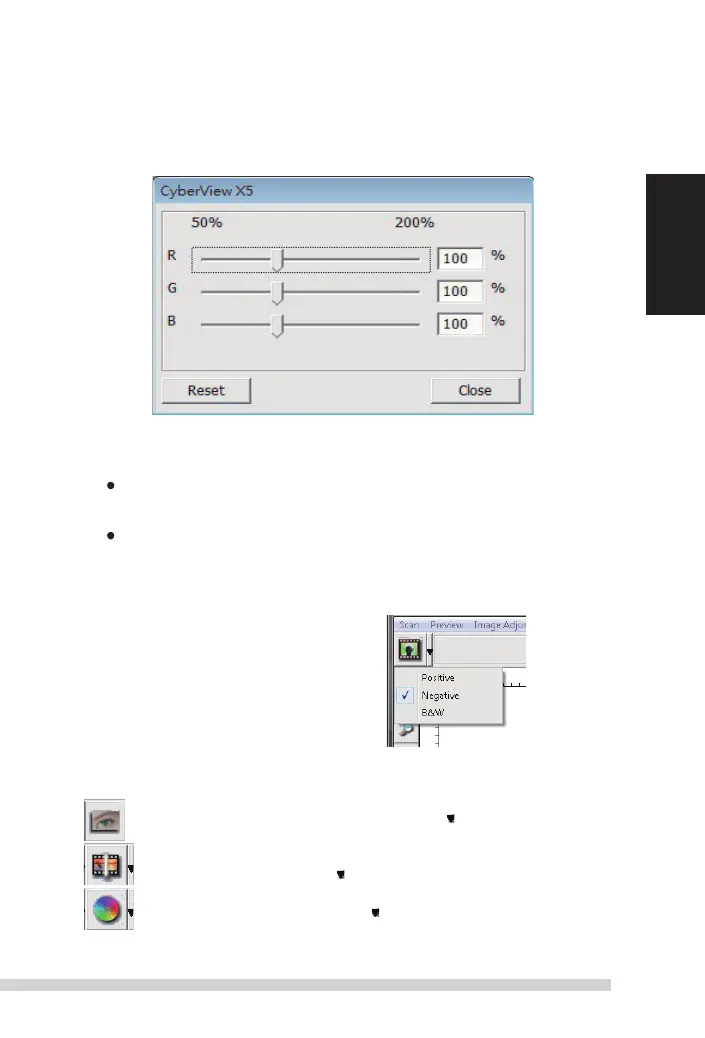
1. exposure setting:
to
adjust the exposure time (R, G, B) press ”
r
eset” to restore to
the default setting.
Menu Commands -
h
elp
B#8,);-Firmware: upgrade the firmware version, select the path where the file of
firmware has been saved. (
t
hese files may be downloaded from our website)
B*7<;displays system information (including operation system, CPu), product
information (including product name, model name, hardware version, firmware ver-
sion, software version, device information including interface and optical resolution).
Function Bar Diagram
Please select your film type
and brand from the toolbar:
-/);1=-7:1;1=-
(also known as
!41,-4)+3)6,
%01;-
ii. Preview Window Area '1?-,%16,7>:(
9-:+)6Pre-scan the current film, press drop down for more options.
!+)6scan film, press drop down button for more options.
5)/-,2<:;5-6;Press drop down button for more options.
Manual-RPS10M.indd 25 23.12.2016 10:00:32


 To Next Page