English
set scan Preferences (Continued...)
3.
t
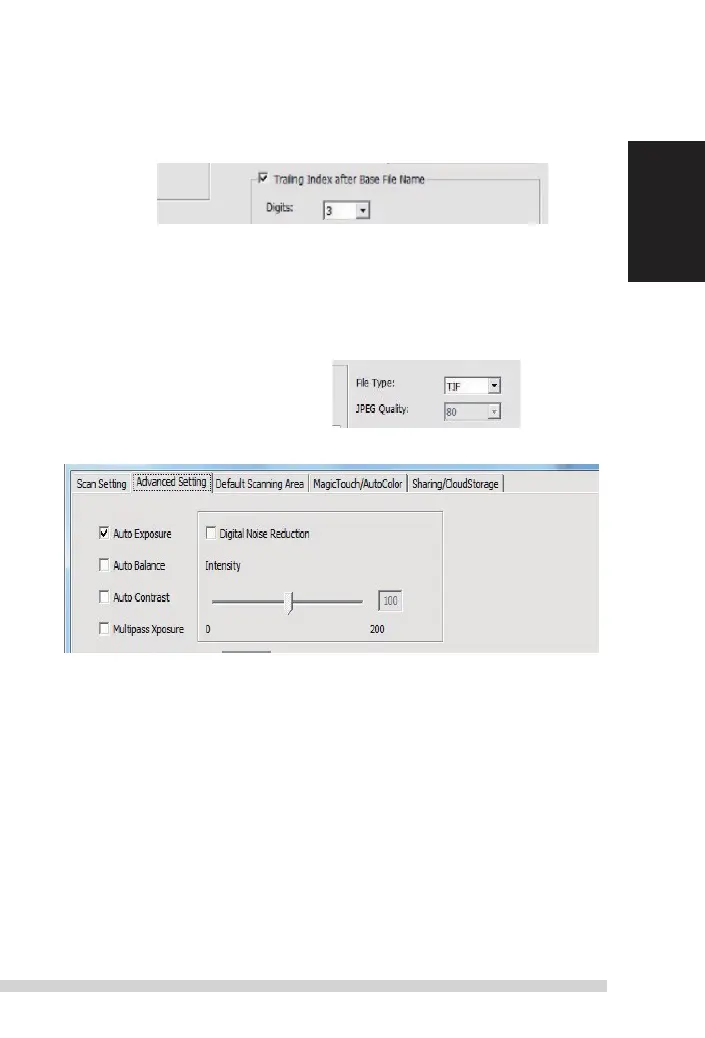
railing index after Base File name digits: denes the length of the
le name and numbering sequence up to 6 digits example image1 or
image000001.
4. options - use Film index: use the number assigned to the frame on it’s posi-
tion.
user dened start number: enter a specic customizable start number
5. Choose the le type ,
“tif”
or “JPG”.
(tif
uncompressed or JPG Compressed-
Choose image quality for JPeG. (20-100) 100 oers the least amount of compres-
sion
advanced
s
etting
”auto
exposure”
-
attempts
to nd the correct exposure to get the widest range
of whites and blacks while putting the middle grays at around the middle of the
data range.
”auto Balance”
- using the image histogram to balance RGB channels. it estimates
images’ color cast and adjust the images accordingly
“auto Contrast”
-
t
he scanner software analyzes the data and automatically
adjusts the setting for the White and Black Points.
”di
gital noise
r
eduction” –
applies
a lter,
r
educing the lm grain.
”multipass Xposure” -
When enabled multi-exposure performs a triple scan to obtain the best possible
image,
t
his process captures the three individual scans, rst a normal pass then two
more scans to highlight the shadow details to expose the darker areas more fully,
t
he software then intuitively calculates the nal scan, which now contains the data
from all three scans.
”multipl
e sampling” -
Congure the settings to scan a single image (multiple times) 2x, 4x, 8x or 16x for
the highest quality output. Please note this greatly increases scan time. With multi-
sampling image noise is a thing of the past.















 To Next Page