PA OPERATION
The CD-3000 has three PA Microphone inputs, 2 Dynamic & 1 Carbon microphone
input. All microphones have priority over all other audio modes and MUTE the
source audio being played when keyed. When the PA is triggered, the front display
will show MIC 1, MIC 2 or MIC, until the trigger is un-keyed. Once released, it will
return to the previous source mode at the previous volume level.
The Dynamic MIC 1 input is the Primary, and the other input MIC 2 is the Secondary.
When the two are keyed simultaneously, the MIC 1 microphone will always have
priority over the MIC 2.
All PA inputs operate regardless of radio power status, as long as both ACC and
Battery power is applied to the radio. The volume levels of MIC 1 & MIC 2 can be
independently adjusted from the radio’s main Volume/Select knob on the front of the
radio. Once released, their final volume levels are stored into memory as default for
the next time they are keyed. The volume levels of MIC 1 & MIC 2 can only
be
adjusted when they are keyed. The volume of the Carbon microphone MIC is only
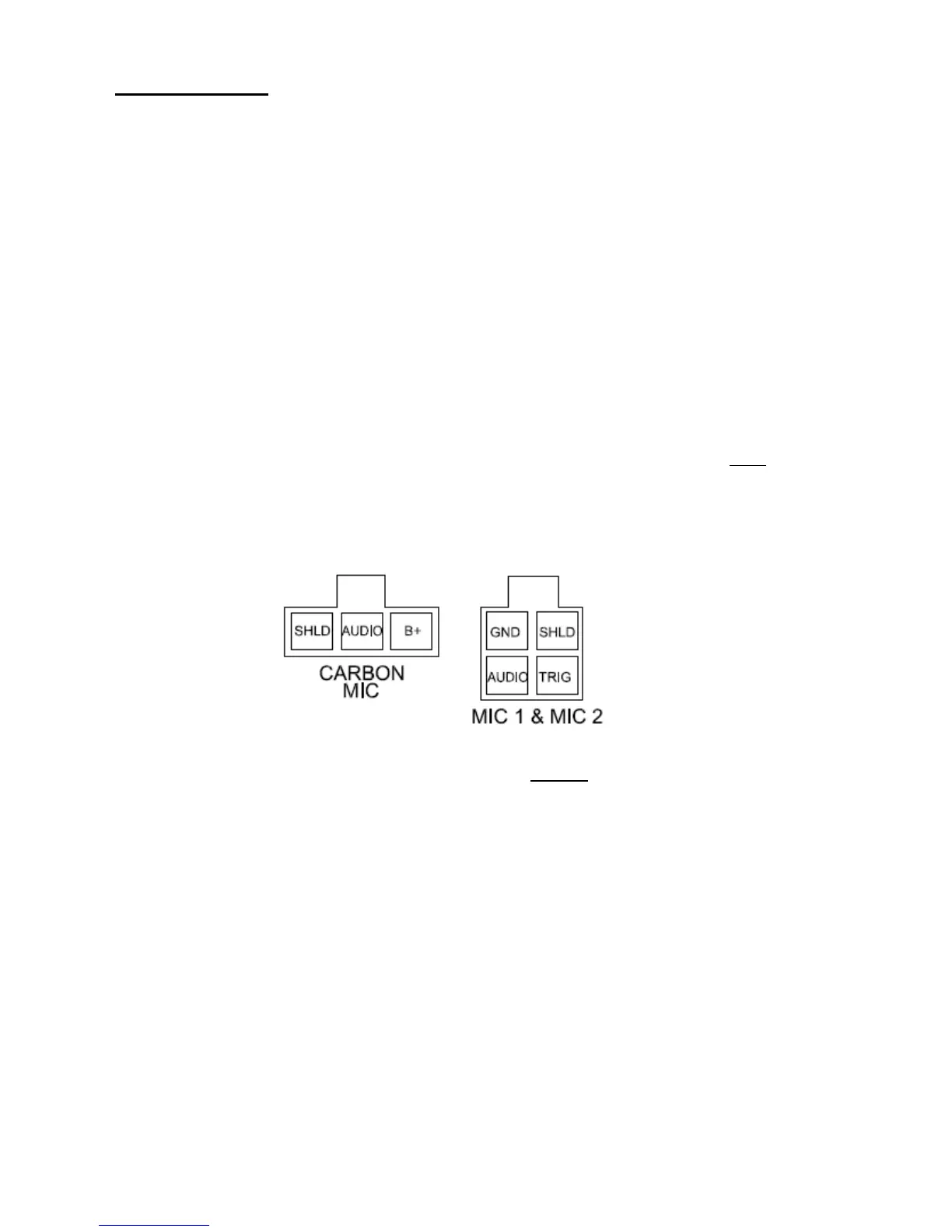
adjustable on the microphone itself and therefore its level is not saved. A rear view
of the radio’s PA pin connections are shown below:
NOTE:
For easy viewing at night, the backlighting will always be on when ACC +12V
switched power is applied. Backlighting will only shut off when the switched ACC
+12V power is removed.


 To Next Page