Installation Guide
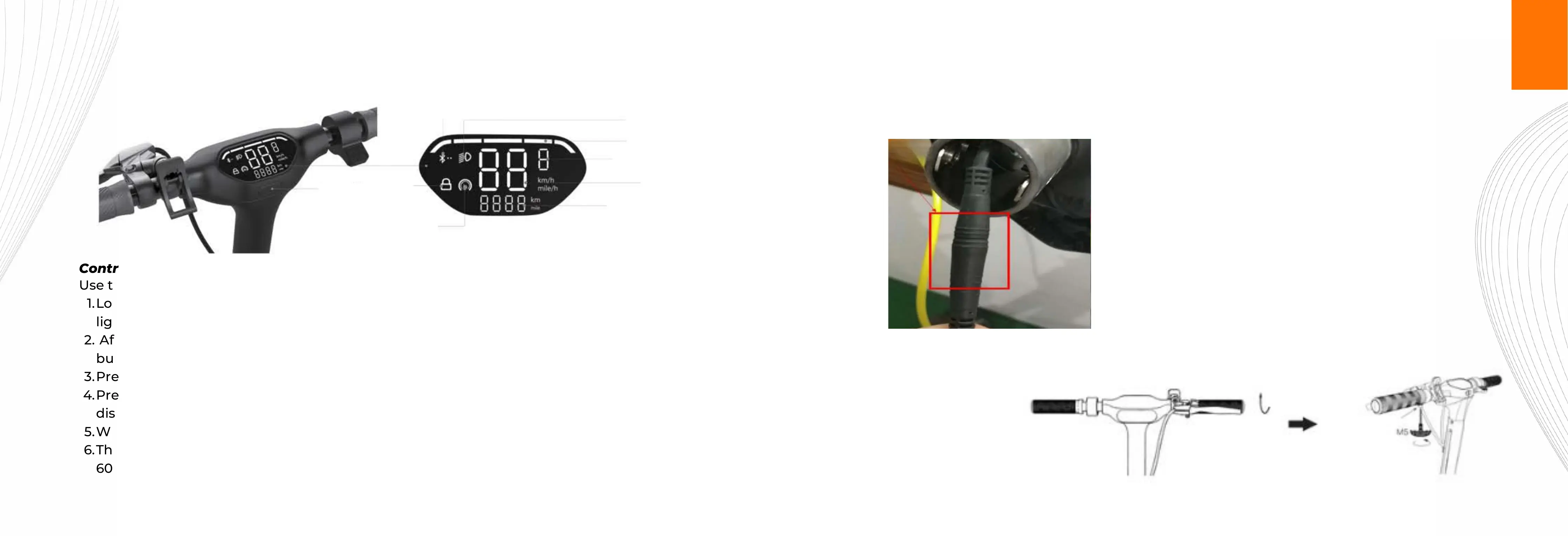
Control Panel
Power switch
Bluetooth status
Headlight status
Battery
Speed gear
Speed
Maximum mileage
Cruise control
Lock
Use the control panel to control the scooter, the specific features are as follows:
Long press the power switch button to turn on the eScooter, also turning on the front light, ambient
lighting, tail light and rear brake light. The control panel shows the power and speed.
1.
After turn on, the control panel display shows "1", indicating that the speed is 1st gear. Press the
button to display 2nd gear; the highest is 3rd gear.
2.
Press the button twice to turn on the front light. Press the button twice again to turn it off.3.
Press the button three times to display the total mileage. Pressing the button three times again will
display the speed.
4.
When using the brake, the rear brake light will get brighter.5.
The battery bar at the top equates to the following: Five Bars = 100%, Four Bars = 80%, Three Bars =
60%, Two Bars = 40% and One Bar = 20 %.
6.
Control Instructions:
Install the brakes to the correct position with the Hex wrench (M5 in the tool bag).
7
8
Connect the wire for the head unit when attaching the head unit.
BUILD ME


 To Next Page