USING THE MEMORY FUNCTION
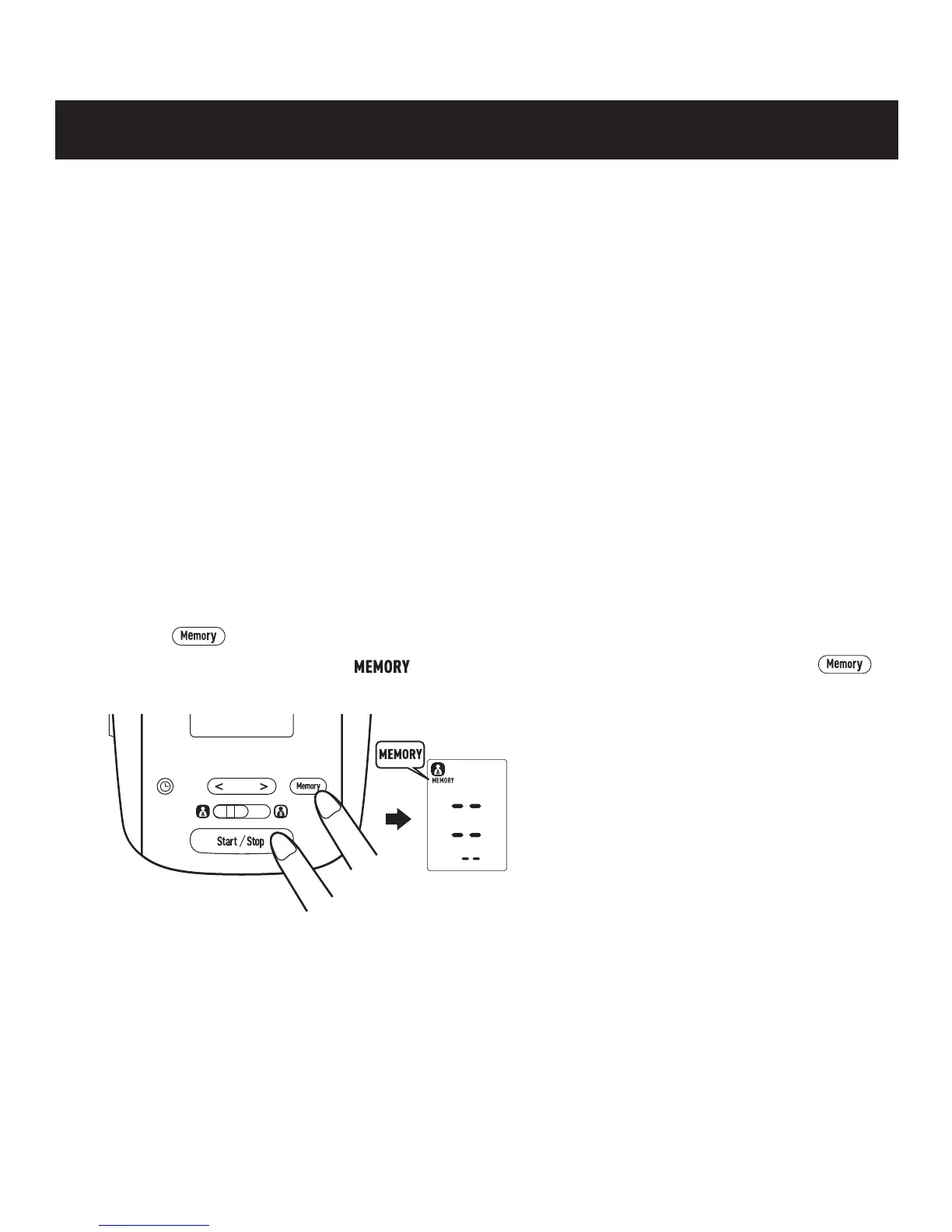
TO DELETE ALL VALUES STORED IN THE MEMORY
The values stored in the memory are deleted by USER ID.
You cannot partially delete values stored in the memory. All values for the user you
select will be deleted.
1. Select your USER ID (A or B).
2. Press the button to turn the monitor on.
3. When the memory symbol ( ) appears, while pressing and holding the
button, press the Start/Stop button for 3 seconds to delete all values in the memory.
4. Press the Start/Stop button to turn the monitor off.
NOTE: The monitor will automatically turn off after 2 minutes.
NOTES: • If the previous measurement was taken without
setting the date and time, the average reading is
not calculated.
• If two sets of measurement values are stored in the
memory for the 10 minute period, the average is
based on the two sets of measurement values. If
only one set of measurement values is stored, this is
displayed as the average.
20


 To Next Page