EasyManua.ls Logo

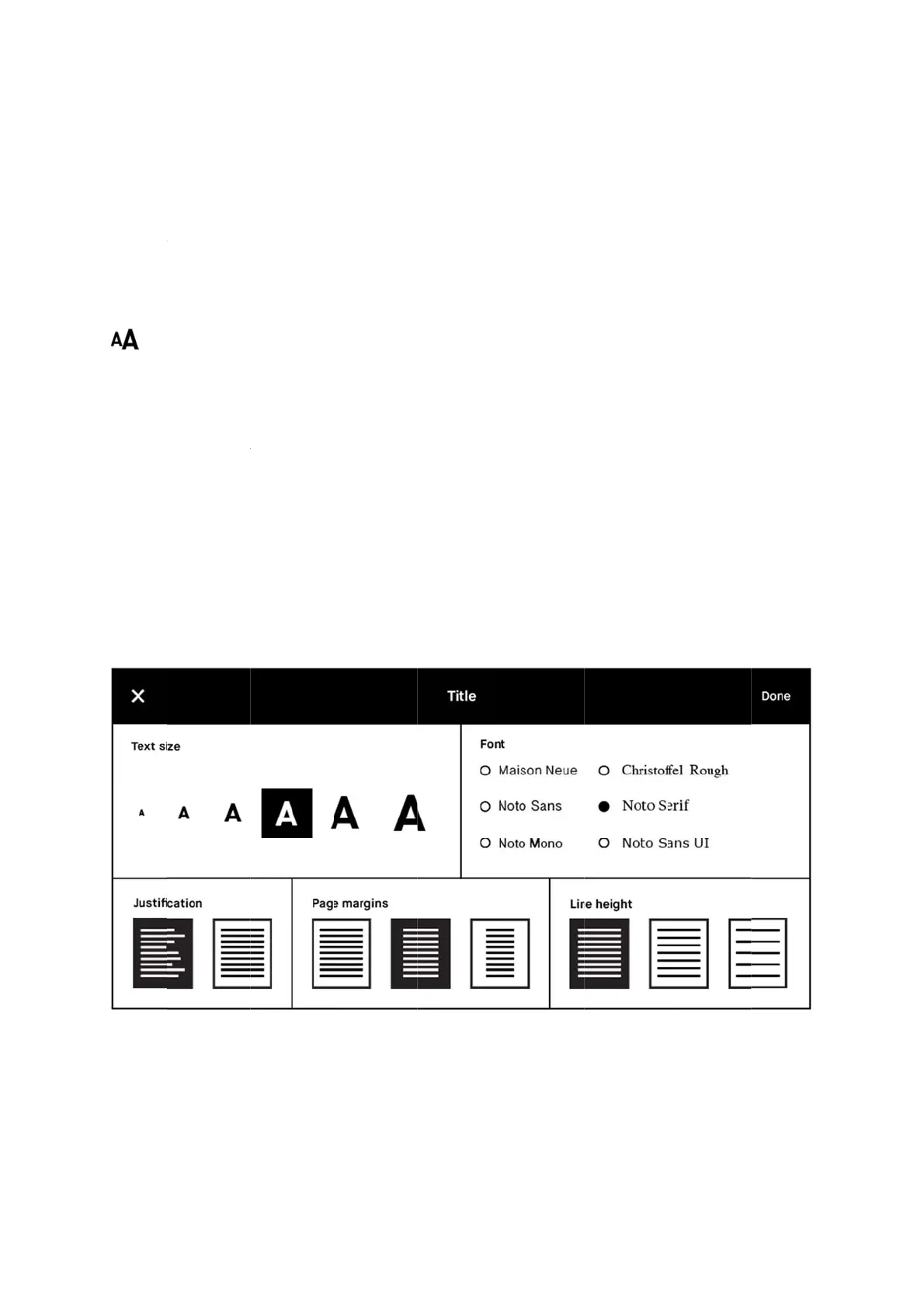
reMarkable RM110 - Text Settings

Default Icon
113 pages
Print Icon
To Next Page IconTo Next Page
To Previous Page IconTo Previous Page
Loading...
5.17
Text s
e
Tailor
t
size, fo
n
ebooks
.
How t
o
1. Ope
n
2. Tap
3. Tap
4. Tap
Text S
e
e
ttin
g
s
t
he ebook v
i
n
t, justifica
t
.
o
chan
g
e t
h
n
the eboo
k
the contex
t
directly on
Done to cl
o
e
ttings
i
ew to you
r
t
ion, page
m
h
e Text Set
t
k
you want
t
t
ual menu
(
a menu op
t
o
se the sett
i
preference
m
argins an
d
Text Setti
n
t
in
g
s:
t
o read.
(
three dots)
t
ion to edit
t
i
ngs.
s by using
T
d
line spaci
n
n
gs
)
on the top
t
he view se
T
ext settin
g
n
g. Text set
t
menu bar
a
t
tings.
g
s, where y
o
t
ings is onl
y
n
d find Te
x
ou can adj
u
y
available
f
x
t settin
g
s.
u
st text
f
or

Other manuals for reMarkable RM110

Related product manuals