62
EN
6. Using the iSense
6.1 Selecting program
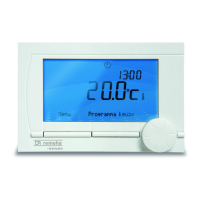
You can select one of the following programs via Program in the main display:
• Clock prog.: the central heating temperature is controlled by the program you have set.
• Day temp.: the temperature remains constant at the day temperature you have set.
• Night temp.: the temperature remains constant at the night temperature you have set.
• Frost temp.: the temperature remains constant at the frost protection temperature you have
set. DHW standby is switched off for this program.
• Holiday prog.: the temperature remains constant at the night temperature, whereby the tap
water is on standby between 6.00 and 23.00 (which means that you will get hot water more
quickly).
6.2 Temporarily changing the temperature
You can (temporarily) switch off a selected clock program or continuous program at any time by
setting the temperature manually.
1. Turn button C from the main display to set a new temperature.
2. Press Adjust time if you also want to set an end time for the manually-selected temperature,
and select this time using push-turn button C.
i
If you do not select an end time and a clock program was active, that clock program will
become active again at the next switch point. Manual operation will then be switched off.



 To Next Page
 Loading...