63
EN
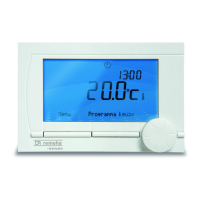
3. Press Adjust date if you also want to set an end date for the manually selected temperature, and
select this time using push-turn button C.
4. Press button C to return to the main menu or wait fi ve seconds until the thermostat automatically
returns to the main menu.
Press the Next program button to cancel the manual temperature change.
6.3 Fireplace mode
Once the temperature has reached the desired level in the room where the iSense has been positioned,
the central heating switches off. This may be inconvenient if, for example, you have an open fi re or if a lot of
people are present in that room. Other rooms in the house are also no longer heated in this situation.
You can switch on the fi replace mode via the Program button so that the other rooms are still heated.
This switches off the built-in room sensor in the iSense. The temperature of the central heating water at
that point is then maintained.
If it becomes too cold or too hot in the other rooms, you can increase or decrease the room temperature
there using push-turn button C on the iSense. This increases or decreases the central heating water
temperature. You can fi t thermostat valves to the radiators in order to individually control the temperatures in
these rooms.
i
The fi replace mode should only be activated if the iSense uses the room temperature to control the
temperature.



 To Next Page