GB.33
GUIDANCE (4/5)
Edit route
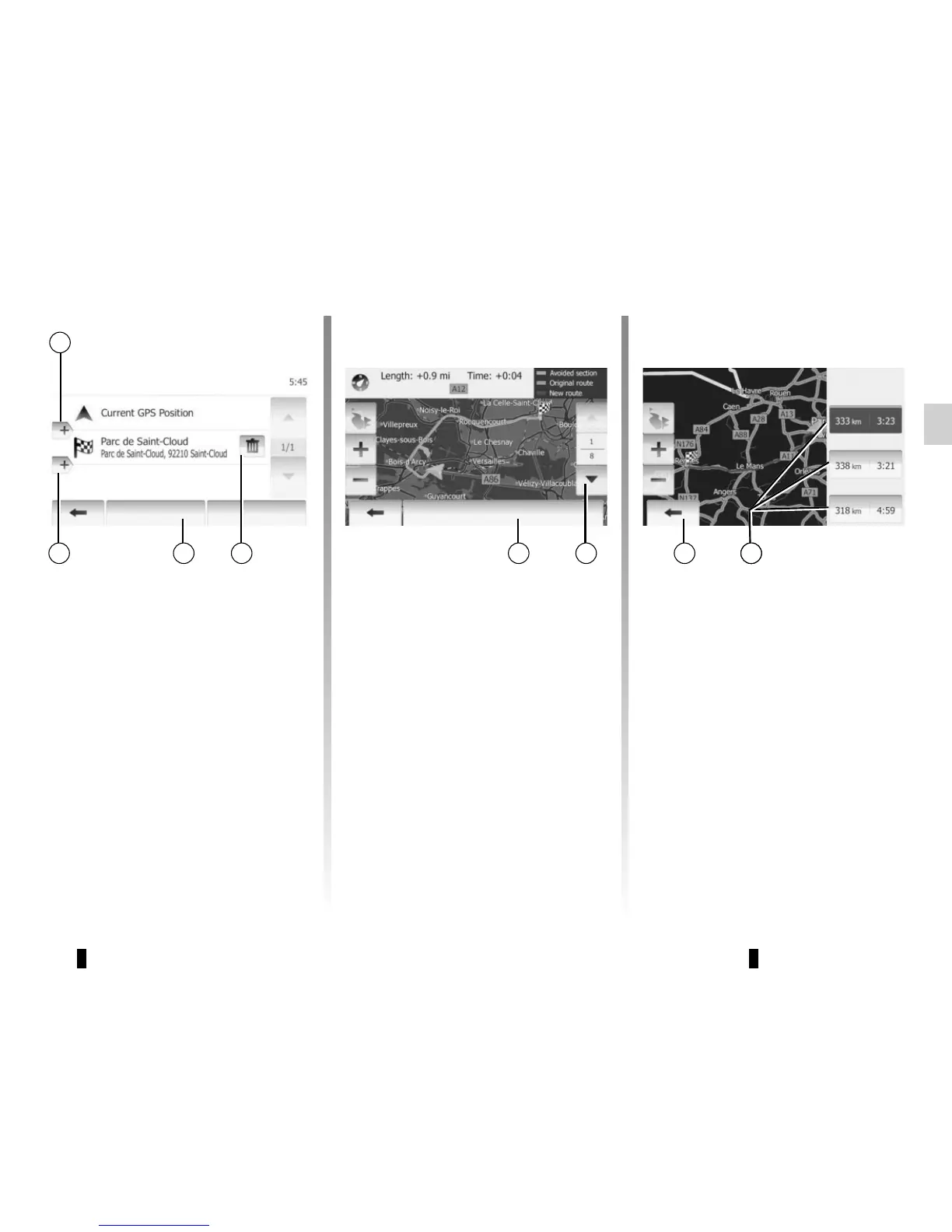
Press “Home” > “Route” > “Edit Route”
to modify the route by changing the list
of stages. You can add or remove way-
points, reorder the list.
Tap 11 to add waypoints and tap 14 to
add a new destination. It offers several
methods to enter a destination. see the
“Entering a destination” section.
Tap 12 to delete a destination.
Tap 13 to reorder the list.
Route Alternatives
This item allows you to change route
planning method.
There are three options with distance
and time to change route planning
method:
– Fast;
– Economical;
– Short.
Refer to the information on “Route set-
tings” in the section on “Navigation set-
tings”.
Tap “Home” > “Route” > “Route
Alternatives” and then tap 17.
Confrim the new route by pressing 18.
14 13
Avoidances
Tap “Home” > “Route” > “Avoidances”
to make a detour. Tap a section on the
list you want to make a detour.
You can change the section by pres-
sing 15.
Confirm the new route by pressing 16.
Cancel the route
At any given moment, you can stop the
guidance.
Press “Home” > “Route” > “Cancel
Route” to cancel the active route.
1516 14141718
11
Options
OK
12
OK
Edit Route
Fast
Route Alternatives
Economical
Short


 To Next Page