EasyManua.ls Logo

Renogy PHOENIX 200 - User Manual

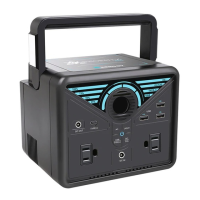
Renogy PHOENIX 200
36 pages
Print Icon
To Next Page IconTo Next Page
Loading...
PHOENIX 200 POWER STATION
USER GUIDE
EN
01
CN
18

Other manuals for Renogy PHOENIX 200

Questions and Answers

  • Q
    qgarzaSep 12, 2025
    What to do if Renogy Portable Generator USB-A fast charge output has overvoltage or undervoltage?
    • D
      Dennis WongSep 12, 2025
      To address a USB-A Fast Charge Output Overvoltage or Undervoltage issue on your Renogy Portable Generator: * Disconnect the devices from the USB-A Fast Charge Ports. * Reconnect the devices to the USB-A Fast Charge Ports. * If the icons persist, further assistance may be needed.
  • Q
    qsimpsonSep 14, 2025
    What to do if Renogy Portable Generator USB-C output has overvoltage or undervoltage?
    • E
      Erica AndrewsSep 14, 2025
      To address a USB-C Output Overvoltage or Undervoltage issue on your Renogy Portable Generator: * Disconnect the device from the USB-C Input/Output Port. * Reconnect the device to the USB-C Input/Output Port. * If the icons persist, further assistance may be needed.

Summary

Important Safety Instructions

Features

Universal Compatibility

Powers essential gadgets and small appliances via multiple output ports.

Easy Recharging

Conveniently charges via wall outlet, car socket, or solar panel.

Comprehensive Protection

BMS provides voltage, temperature, and short circuit protection for safety.

Powerful Flashlight

Multi-mode LED flashlights on carrying handle for emergencies.

Product Overview

Specifications

Battery Level LED Indicators

Recharging Your Phoenix 200

Operating Your Phoenix 200

Operation Time

Estimates device runtimes based on battery capacity and device power consumption.

Powering Your Devices

Maintenance

Troubleshooting

Frequently Asked Questions

Warranty

Renogy PHOENIX 200 Specifications

General IconGeneral
BrandRenogy
ModelPHOENIX 200
CategoryPortable Generator
LanguageEnglish