4 English
Indicators
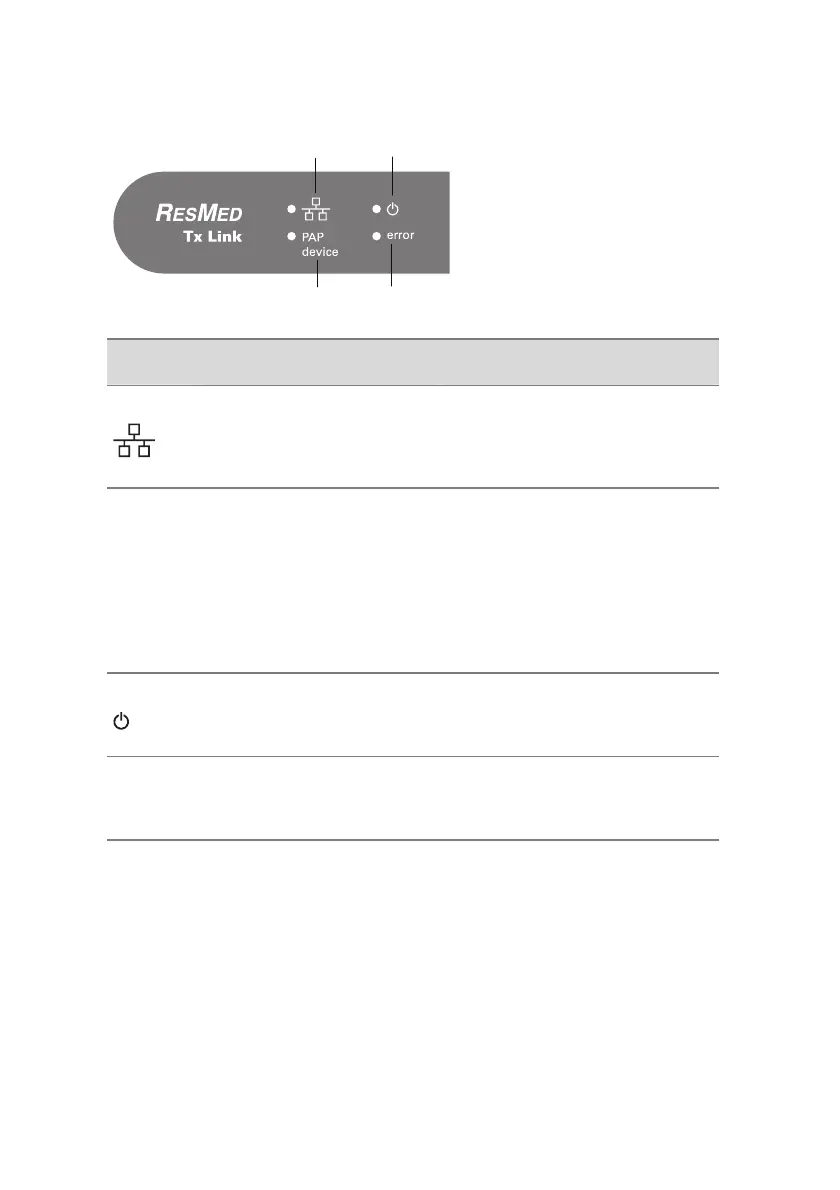
Tx Link provides four LEDs to indicate the current operating state:
1
3
2 4
Indicator Status
1
Ethernet
Indicates Tx Link's connectivity
to the network.
The LED illuminates when connected
to the network and flashes to
indicate network traffic.
2
PAP
device
Positive airway pressure
therapy device
Indicates the operating state of
the connected therapy device.
The LED illuminates when connected
to a therapy device and flashes to
indicate communication.
The LED is off when disconnected
from a therapy device.
3
Power
Indicates the operating state of
Tx Link.
The LED illuminates when Tx Link is
powered on.
4
error
Device failure
Indicates if Tx Link has failed.
The LED illuminates or flashes to
indicate an internal failure.
The LEDs may be disabled during normal use to avoid patient disruption.
However, in the disabled state, the LEDs will continue to indicate Tx Link status
during power-up, or any system error state.
For more information on enabling and disabling LEDs, refer to the EasyCare Tx
Online Help.









 To Next Page