EasyManua.ls Logo

ReSound Nexia NX960S-DRWC - User Manual

ReSound Nexia NX960S-DRWC
76 pages
Print Icon
To Next Page IconTo Next Page
Loading...
resound.com
ReSound Nexia
User guide
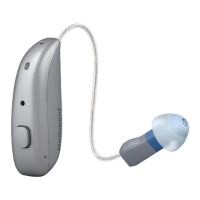
ReSound Receiver-In-Ear hearing aids, Rechargeable

Questions and Answers

ReSound Nexia NX960S-DRWC Specifications

General IconGeneral
TelecoilYes
Wireless ConnectivityBluetooth
Directional MicrophonesYes
Feedback CancellationDFS Ultra III
Noise ReductionYes
Wind Noise ReductionYes
CompatibilityiOS and Android

Summary

Hearing Aid Information

FDA Warnings and Cautions

Hearing Loss in Minors

Specific safety advice for individuals under 18 regarding hearing aid use and medical evaluations.

Introduction to ReSound Nexia

Intended Purpose and Use

Explains the primary function of the hearing aid and who it is intended for.

Potential Side Effects

Lists possible adverse reactions or discomforts experienced during hearing aid use.

Understanding Symbols

Explains the meaning of various warning, caution, and informational symbols used in the manual.

Getting to Know Your Hearing Aid

Device Components: Domes and Receivers

Describes different types of domes, earmolds, and receivers for fitting the hearing aid.

Securing the Hearing Aid: Sport Lock

Details the function and use of the sport lock accessory for securing the hearing aid during activity.

Preparing Your Hearing Aid for Use

Battery Safety and Charging

Critical safety precautions for the rechargeable battery and instructions for charging the device.

Fitting Your Hearing Aid

Identifying Left and Right Aids

Guidance on distinguishing between the left and right hearing aids for correct placement.

Inserting Receiver Domes

Step-by-step instructions for correctly inserting the hearing aid's receiver dome into the ear canal.

Inserting Earmolds

Detailed guide on how to properly insert custom earmolds into the ear for a secure fit.

Removing Your Hearing Aid

Removing Receiver Domes

Instructions for safely removing the hearing aid's receiver domes from the ear.

Removing Earmolds

Instructions on how to properly and safely remove custom earmolds from the ear.

Using Your Hearing Aid

Powering On;Off and Indicator Lights

Procedures for turning the hearing aids on/off and understanding indicator light signals.

Smart Start and Listening Programs

Explanation of Smart Start feature and available listening programs for various environments.

Controls: Push Button and Tap

Instructions on using the push button and tap control for changing programs and functions.

Audio Streaming and Phone Calls

Guidance on streaming audio from devices and using the hearing aid for mobile phone calls.

Telephone and Mobile Phone Use

Tips for using telephones and general information on mobile phone compatibility.

Advanced Options and Connectivity

Connecting with Apple Devices

Details on using the hearing aids with iPhone, iPad, and iPod touch for streaming and control.

Android Device Streaming

Information on requirements and compatibility for streaming audio from Android smartphones.

Mobile App Control: ReSound Smart 3 D

How to use the ReSound Smart 3D™ app for controlling hearing aid functions and settings.

Remote Adjustments: ReSound Assist

Explanation of remote adjustment and live assistance services for hearing aid optimization.

Flight Mode and Wireless Communication

Instructions on activating flight mode or turning off wireless communication for specific situations.

Cleaning and Caring for Your Hearing Aid

Cleaning Tools and General Maintenance

Identifies cleaning tools and provides general guidelines for maintaining the hearing aids.

Daily Cleaning and Care

Specific daily cleaning steps to keep the hearing aids clean and dry.

Changing Hearing Aid Domes

Instructions and recommendations for replacing the domes on the hearing aid receivers.

Replacing Standard and Tulip Domes

Step-by-step guide on how to remove and replace standard and tulip domes.

Changing the Wax Filter

Guide on how to replace the wax filter to prevent earwax buildup in the receiver.

Wireless Accessories

Available Accessories and Features

Overview of various wireless accessories and their specific functionalities for enhanced hearing.

Connecting Wireless Accessories

Instructions on how to connect to and activate paired wireless accessories with the hearing aids.

Tinnitus Management

Tinnitus Sound Generator (TSG) Module

Introduction to the Tinnitus Sound Generator (TSG) module for tinnitus symptom relief.

TSG Module Usage and Specifications

Guidance on using the TSG module and its technical specifications for sound generation.

General Safety and Warnings

Essential Consultations and Power Aid Warnings

Advises consulting professionals and highlights warnings related to power hearing aids.

Cyber Security

Security Precautions

Precautions to ensure the security and integrity of the hearing aid's data and connection.

Troubleshooting Common Issues

Regulatory and Compliance Information

Warranties, Repairs, and Ambient Conditions

Information on warranty, repair services, and environmental operating conditions for the hearing aids.

Product Lifespan and Testing Data

Details the expected service lifetime of components and results of non-clinical testing.

Clinical Data and Compliance Statement

Information on clinical evaluation, device compliance with FCC/ISED rules, and statements.

Product Variants and Designations

Lists product type designations, FCC/IC IDs, and available hearing aid variants.

Technical Specifications

RIE LP;MP Receiver Specifications

Presents detailed technical specifications for the RIE LP/MP receiver models.

RIE HP;UP Receiver Specifications

Details the technical specifications for the RIE HP/UP receiver models.

RIE MM Receiver Specifications

Provides technical specifications for the RIE MM receiver models.

Additional Information

Acknowledgements and Licensing

Lists acknowledgements and licensing terms for software components used in the hearing aid.

Notes

Related product manuals