8
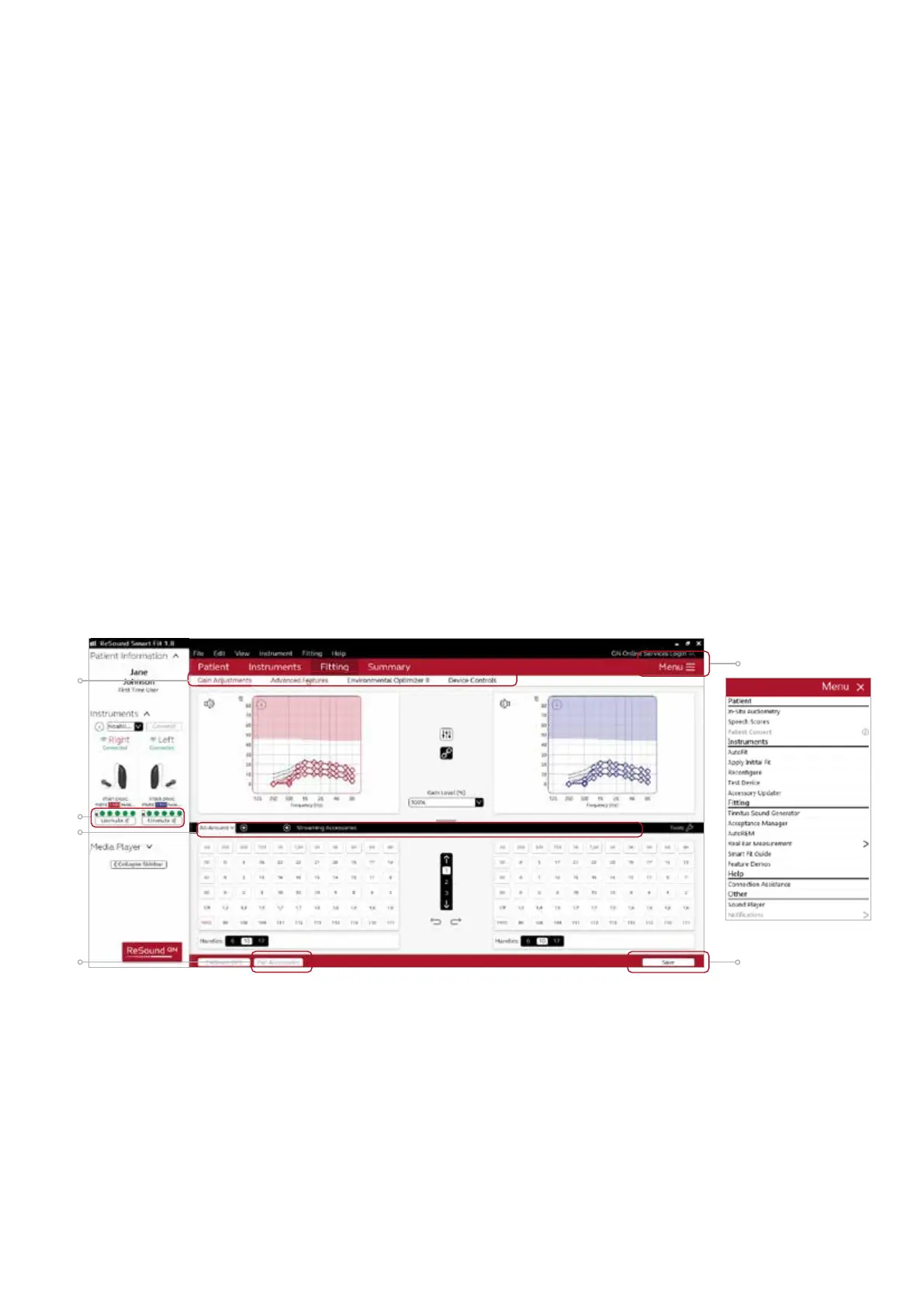
Fitting screen
On the fitting screen gain, adjustments can be made as well as modification to advanced features such as
Environmental Optimizer II.
1. Gain adjustments can be made to one or several frequencies by selecting frequencies between 250 Hz
and 8,000 Hz on the gain grid and then by clicking the up and down arrows found between the right
and left ear grids. Gain can be adjusted for soft, average, and loud input levels which alters average the
compression ratios noted above the MPO.
2. Access to advanced features and hearing aid controls is also found on the Fitting screen. The tabs below
the red navigation bar will provide access to these tools.
3. Additional tools and features can be found in the upper right menu.
4. Programs are listed in the program tabs. To select a dierent program select arrow in tab to view program
options. Select the ‘+’ to add additional programs. Program tools can be found in the tab on the far right.
5. Click the ‘Save’ button to save fitting to hearing aids and database.
6. Wireless accessories can be paired both outside and inside the software. To pair inside the software select
‘Pair accessories’ to access the accessories screen. Be sure that the accessory is charged or plugged in, and
turned on during the pairing process.
7. The power level of the hearing aids is displayed in the left panel. The green dots indicate the amount of
charge left in the devices, as also shown on the charger itself.
3
5
6
2
4
7









 To Next Page