Familiar with the device
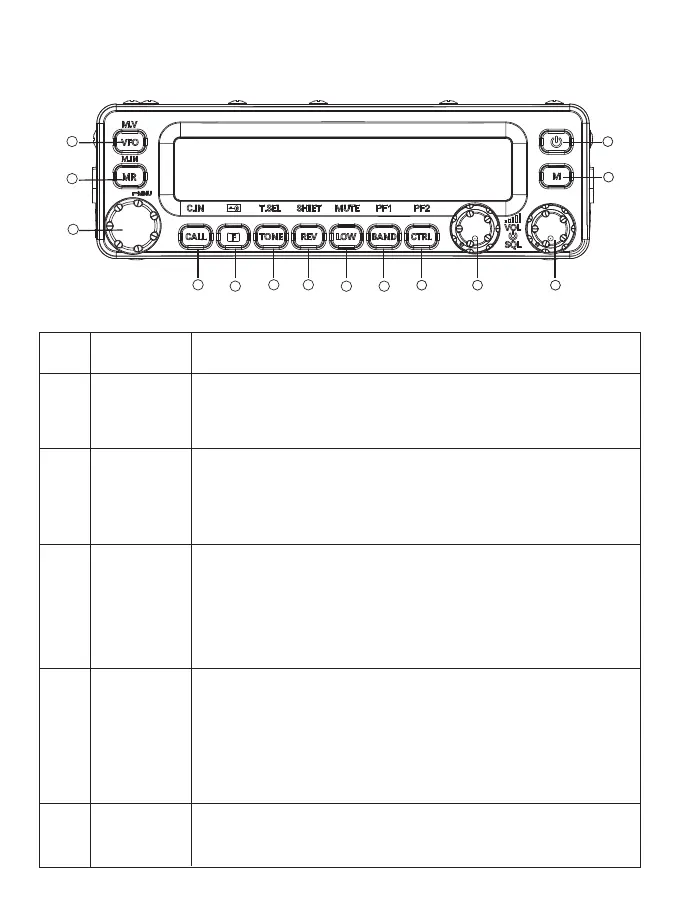
FRONT PANEL
NO.
① 【VFO】
Button/Knob Description
Press [VFO] to enter VFO mode, rotate the tuning control knob to
select the operating frequency. Press [VFO] 1 second to sta the VFO
scanning. Press [F] and then[VFO] to copy the current memo
channel or the current call channel to VFO (memo shift).
②
③
④
⑤
【MR】
【Tuning
control knob】
【CALL】
【F】
Press [MR] to enter memo channel mode, rotate the tuning control
knob to select the memo channel. Press [MR] 1 second to enable
memo channel scanning. Select a memo channel and press [F]
then [MR] to store the current operating frequency in the memo
channel.
Rotate this knob to select the operating frequency or memo
channel, change the scanning direction, select audio, etc.
Pressing the tuning knob can enter MHz mode (in VFO or call mode)
or switch channel name and frequency display (in memo channel
mode). Press [F], then press the tuning control knob to enter the
menu mode. Pressing the tuning control (1 second) can sta the MHz
scanning or group scanning.
Press [CALL] will display the call channels, default 2 call channels.
Press [BAND] can switch VHF call channel and UHF call channel.
Press [CALL] 1 second to sta the call scanning.
Quick press down [F] then [CALL] can store one VFO frequency to
replace the call channel.
Press [F]+VFO or press [F]+MR will store the call channel to VFO
frequency and a MR channel.
Press [F] to enter the function mode. Press [F] for one second to
enable or disable the key lock function on the radio.
6
1
2
3
4
5
6 7
8 9
13
10 11 12
14



 To Next Page