6
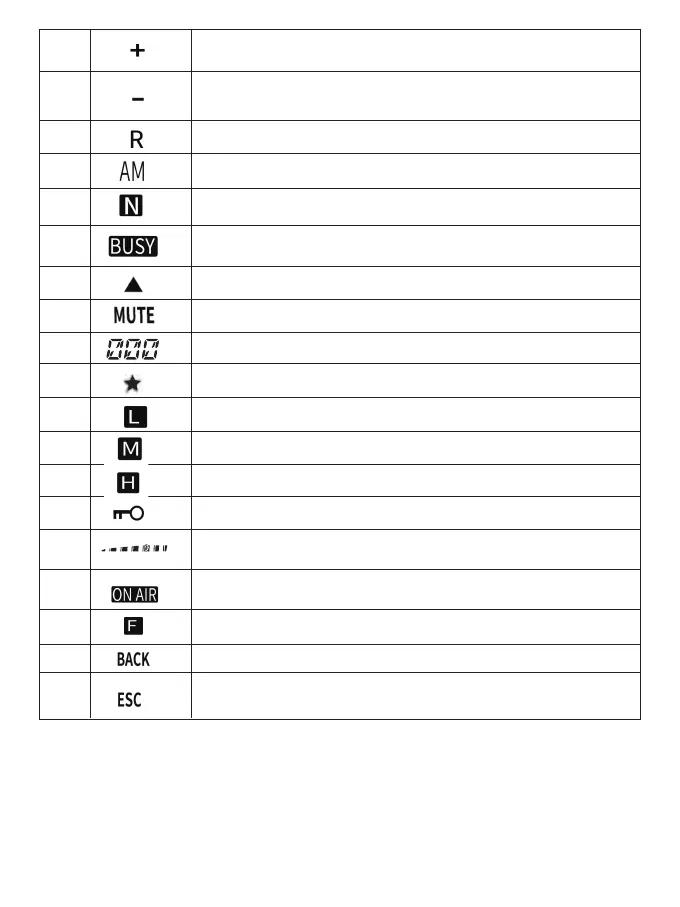
Appears when the transmission frequency oset function is set to
positive.
7
8
9
10
11
12
13
14
15
16
17
18
19
20
21
22
23
24
Appears when the transmission frequency oset function is set to
negative.
Appears when the reverse function is turned on.
Appears when in AM mode.
Appears when in narrowband FM mode.
Current channel busy state (or mute o)
Appears when setting the selected channel in memo input mode.
Mute function status.
Appears when channel scanning is skipped.
Displays the memo channel and menu number.
Transmitting low-power state.
Transmitting middle-power state.
Transmitting high-power state.
Keyboard knob lock.
Appears during transmitting.
Appears when the [ F ] key is pressed.
Appears when accessing the menu.
Appears when in menu mode and when selecting audio/CTS/DCS
codes.
Displays the signal strength meter when receiving signals and display
the selected power level when transmitting.
REAR PANEL
8



 To Next Page